MCP server · Developer tools · official
AWS MCP servers
by awslabs · official
Connect your AI to Amazon Web Services so it can look up docs, check resources, and help with cloud tasks.

This is a collection of helper programs made by Amazon Web Services (AWS) that plug into your AI assistant. Each one gives your AI a specific cloud skill, like reading the latest AWS documentation or helping you manage cloud resources. It is handy if you work with AWS and want your AI to answer questions using current, official information instead of guessing.
What is an MCP server? The 30-second version
On its own, your AI can only chat using what it already learned. An MCP server is a small helper program that gives your AI a new skill or a connection to an app or service. Here, the helpers connect your AI to AWS, so it can look things up or do things there when you ask. You stay in your normal chat window, and the helper does the behind-the-scenes work.
What this MCP server does
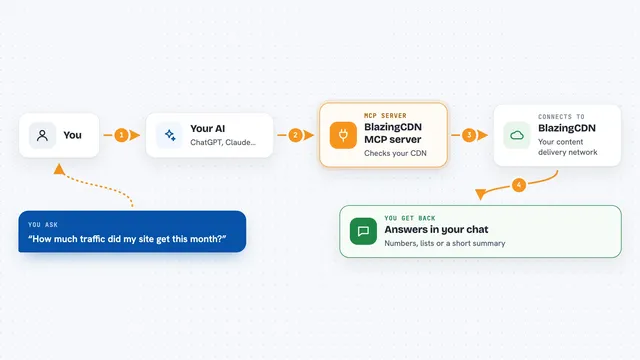
You ask your AI a question about AWS, like how a service works or what the latest docs say. Your AI passes that request to the right AWS helper program. The helper talks to AWS, either to fetch documentation or to work with your cloud resources. Then it sends the answer back, and your AI explains it to you in the chat. There are many helpers in this suite, each focused on a different part of AWS.
 Click to zoom
What you can do with it
- Look up the latest official AWS documentation and API references
- Get guidance on AWS best practices and Well-Architected advice
- Read What's New posts and blog articles from AWS
- Help with infrastructure and deployment tasks using AWS tools
- Explore and manage AWS resources you have access to
- Find getting-started information for AWS services
Try asking your AI
- “What is the latest way to set up an S3 bucket according to AWS docs?”
- “Show me recent AWS What's New posts about Lambda”
- “Help me understand the best practices for setting up a VPC”
- “What does the AWS documentation say about DynamoDB pricing?”
What it gives back to you
You get answers in your normal chat, written in plain language. Depending on what you asked, it might be a summary of documentation, a list of recent AWS updates, or step-by-step guidance. If the helper worked with your cloud resources, it may also report what it found or what it changed. Everything shows up as text you can read and copy.
Before you start
What you need
- An AWS account if you want to work with your own cloud resources
- AWS access keys or a configured AWS login (a kind of password your AI uses to reach your account)
- An AI app that supports MCP servers, like Claude Desktop, Cursor, or VS Code
- Node.js or Python installed on your computer, depending on which helper you pick
Good to know
Some helpers can read or change things in your AWS account, so only connect the ones you trust and check what your AI is about to do before you let it run.
Install it with your AI
Add AWS MCP servers to your AI, no technical skills needed
You don't install anything by hand. You copy one prompt, paste it into an AI that can work on your computer, and it checks, installs and connects the server for you, asking you when it needs something.
Sign in to get the install prompt
Members get a ready-made prompt that lets the Claude desktop app check AWS MCP servers, install it and connect it for them, step by step. You don't need any technical skills: you copy, paste and answer a few questions. Your connected AI can also find and install any of the 4,361 MCP servers here for you.
Who it's for
People who work with Amazon Web Services, like cloud engineers, developers, and IT staff who want their AI to answer AWS questions using current official information.