MCP server · Developer tools · official
Alibaba Cloud Ops MCP server
by aliyun · official
Lets your AI look at and manage your Alibaba Cloud servers, storage, and databases for you.
This is a helper made by Alibaba Cloud themselves. It connects your AI assistant to your Alibaba Cloud account, so you can ask in plain words and the AI will check or change things there. It is handy if you already run servers or databases on Alibaba Cloud and want less clicking around the web console.
What is an MCP server? The 30-second version
On its own, your AI can only chat. An MCP server is a small helper program that gives your AI a new skill or a connection to an app or service. This one connects your AI to Alibaba Cloud, so when you ask about your servers or databases, the AI can actually go and look, or do the task for you. You install it once, add your Alibaba Cloud keys, and then just talk to your AI like usual.
What this MCP server does
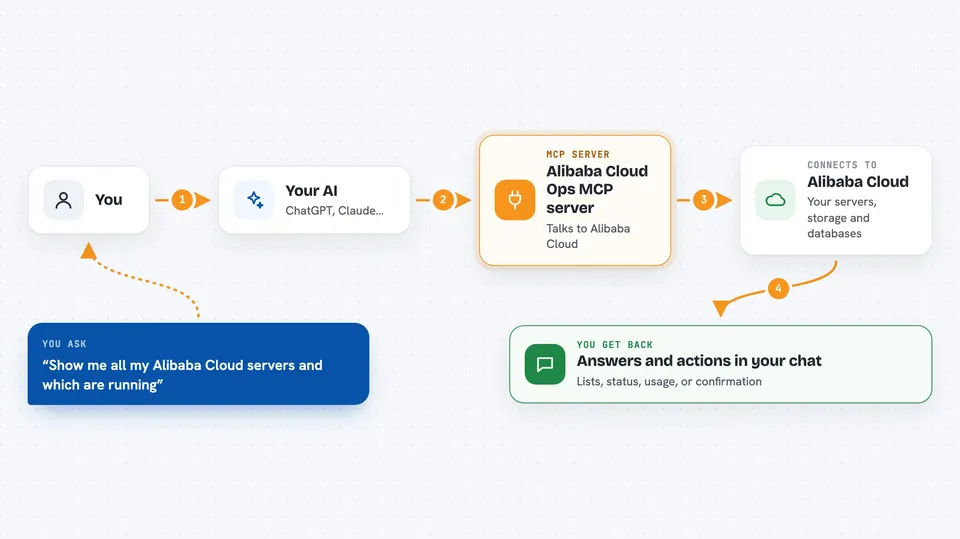
You ask your AI something like how your servers are doing or to start one that is stopped. The AI passes that request to this helper. The helper talks to Alibaba Cloud on your behalf using the keys you gave it. Then it brings the answer back, or makes the change you asked for, and the AI tells you what happened in the chat.
 Click to zoom
What you can do with it
- List your cloud servers and see their status
- Start, stop, or reboot a server
- Create a new server or delete one you no longer need
- Run a command on a server without logging in
- Check CPU, memory, and disk usage of your servers
- List, create, or delete storage buckets
- Start, stop, or restart your databases
Try asking your AI
- “Show me all my Alibaba Cloud servers and which ones are running”
- “Stop the server named web-prod-01”
- “What is the CPU usage on my servers over the last hour”
- “List my storage buckets and what is inside them”
What it gives back to you
You get answers in the chat, like a list of servers with their names and status, or a short summary of CPU and memory numbers. When you ask it to do something, it tells you whether the action went through. For deployments, it can report the status of the job it started.
Before you start
What you need
- An Alibaba Cloud account with resources in it
- An Access Key ID and Access Key Secret from Alibaba Cloud (these are like a username and password for apps; you create them in your Alibaba Cloud console)
- An AI app that supports MCP servers, like Cline in VS Code or Cursor
- uv installed on your computer (a small tool the setup page shows you how to install)
Install it with your AI
Add Alibaba Cloud Ops MCP server to your AI, no technical skills needed
You don't install anything by hand. You copy one prompt, paste it into an AI that can work on your computer, and it checks, installs and connects the server for you, asking you when it needs something.
Sign in to get the install prompt
Members get a ready-made prompt that lets the Claude desktop app check Alibaba Cloud Ops MCP server, install it and connect it for them, step by step. You don't need any technical skills: you copy, paste and answer a few questions. Your connected AI can also find and install any of the 4,361 MCP servers here for you.
Who it's for
People who already run servers, databases, or storage on Alibaba Cloud and want to check or manage them by chatting instead of clicking through the web console.