
MCP server · Developer tools · official
AgentMetal MCP server
by agentmetal · official
Lets your AI rent, log into, and manage a Linux server for you, paying with USDC or a card.
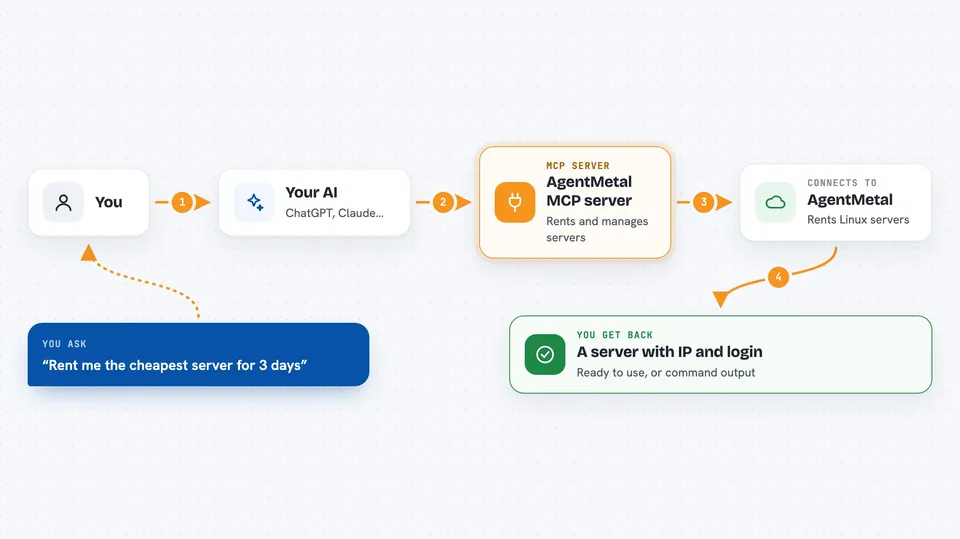
This is a helper that lets your AI assistant rent a Linux server (a computer in a data center) and then run commands on it, check on it, and shut it down when you are done. It is handy if you need a temporary server for a project but do not want to sign up for a cloud account or click through a dashboard. You just tell your AI what you need and it handles the rest.
What is an MCP server? The 30-second version
On its own, your AI can only chat. An MCP server is a small helper program that gives your AI a new skill or a connection to an outside service. This one connects your AI to AgentMetal, a place that rents Linux servers. Once it is set up, your AI can look up prices, rent a server, log in, and run commands there when you ask.
What this MCP server does
You ask your AI for a server, for example how much a small one costs for a week. The AI uses this helper to check the AgentMetal catalog and tells you the price. If you say yes, the AI pays with USDC (a kind of digital dollar) or a card and gets back a server with an IP address and login details. From then on, you can ask the AI to run commands on that server, reboot it, check its health, or destroy it when you are finished.
 Click to zoom
What you can do with it
- Look up available server plans, locations, and add-on prices
- Rent a Linux server for a set number of days
- Log into the server and run shell commands as root
- Check a server's status, IP address, and expiry date
- List all servers tied to your wallet or account
- Extend a server's lease by a few more days
- Reboot or destroy a server you own
- Open or close firewall ports on a server
Try asking your AI
- “What Linux server plans do you have and how much do they cost?”
- “Rent me the cheapest server for 3 days and set it up with a managed key.”
- “Run 'df -h' on my server and tell me how much disk space is left.”
- “Extend my server by 7 more days.”
- “Destroy my server, I am done with it.”
What it gives back to you
You get back plain answers in the chat: a list of plans with prices, a server ID and IP address after renting, the output of any command you run, or a short status report. If you ask for diagnostics, you get numbers like CPU and disk usage, plus a link to a console view. When you destroy a server, you get a confirmation that it is gone.
Before you start
What you need
- A wallet with USDC on the Base network (for paid actions), or a card
- A wallet private key set as WALLET_PRIVATE_KEY in the config
- An AgentMetal account API key (am_live_...) for account-only actions like destroy, reboot, logs, and exec
- Node.js installed on your computer to run the server
Good to know
This can spend real money (USDC) and can run commands as root on your server, so double-check what you ask it to do.
Install it with your AI
Add AgentMetal MCP server to your AI, no technical skills needed
You don't install anything by hand. You copy one prompt, paste it into an AI that can work on your computer, and it checks, installs and connects the server for you, asking you when it needs something.
Sign in to get the install prompt
Members get a ready-made prompt that lets the Claude desktop app check AgentMetal MCP server, install it and connect it for them, step by step. You don't need any technical skills: you copy, paste and answer a few questions. Your connected AI can also find and install any of the 4,609 MCP servers here for you.
Who it's for
Developers, tinkerers, and anyone who wants a quick Linux server without signing up for a big cloud provider, especially if they are comfortable with crypto payments or just want their AI to handle the setup.




