
MCP server · Security
MCP-Dandan security monitor
by 82ch
Watch your AI's tool calls in real time and block suspicious behavior before it causes harm.
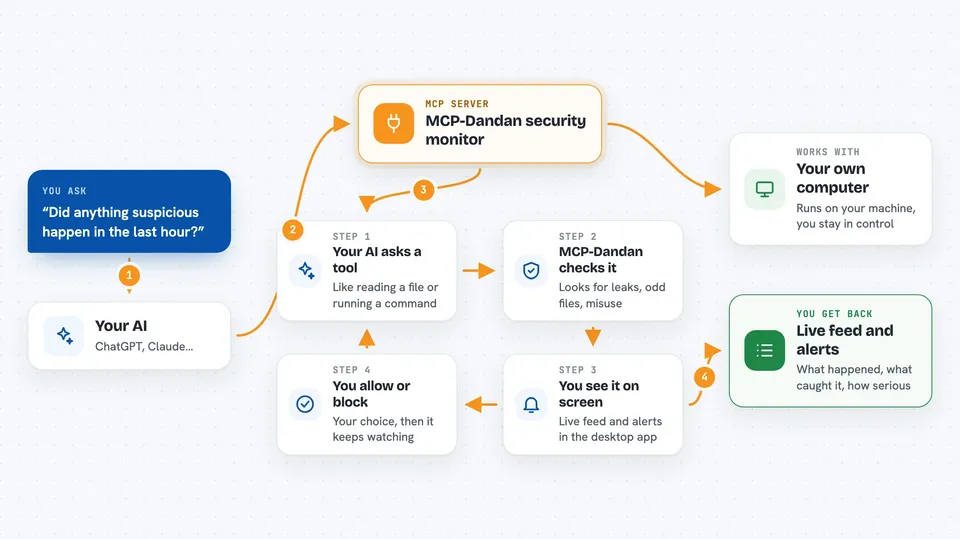
MCP-Dandan is a security monitor for your AI assistant. It watches what your AI is doing behind the scenes and warns you when something looks risky. It is handy for anyone who lets an AI read files, run commands, or connect to other apps and wants a safety net.
What is an MCP server? The 30-second version
On its own, your AI can only chat. An MCP server is a small helper program that gives your AI a new skill or a connection to an app or service. This one, MCP-Dandan, sits between your AI and the tools it uses, watching every request for signs of trouble. When something looks off, it can alert you or block the action.
What this MCP server does
You run MCP-Dandan on your own computer. It watches the messages your AI sends to its tools, like when the AI asks to read a file or run a command. It checks each request against several detection engines that look for command injection, file exposure, personal data leaks, data exfiltration, and tool misuse. If it finds a threat, it shows you in a desktop app and can block the action. You stay in control the whole time.
 Click to zoom
What you can do with it
- See every tool call your AI makes in a live dashboard
- Get alerts when the AI tries to read sensitive files
- Block suspicious actions before they happen
- Detect when personal information might be leaked
- Spot unusual data transfers
- Catch when a tool is used in a way it was not meant for
- Add your own rules for what counts as personal data
Try asking your AI
- “Show me the latest tool calls from my AI”
- “Did anything suspicious happen in the last hour?”
- “Block that file read request”
- “Add a rule to flag any mention of social security numbers”
What it gives back to you
You get a live feed of tool calls and alerts in the desktop app. Each alert tells you what happened, which engine caught it, and how serious it is. You can then choose to allow or block the action. The app also keeps logs you can review later.
Before you start
What you need
- Node.js and Python installed on your computer
- A Mistral API key (a password from Mistral's website, free to get) if you want the tool misuse detection
- The MCP-Dandan app downloaded from GitHub
Good to know
This tool watches everything your AI does, so make sure you are comfortable with that level of monitoring.
Install it with your AI
Add MCP-Dandan security monitor to your AI, no technical skills needed
You don't install anything by hand. You copy one prompt, paste it into an AI that can work on your computer, and it checks, installs and connects the server for you, asking you when it needs something.
Sign in to get the install prompt
Members get a ready-made prompt that lets the Claude desktop app check MCP-Dandan security monitor, install it and connect it for them, step by step. You don't need any technical skills: you copy, paste and answer a few questions. Your connected AI can also find and install any of the 4,361 MCP servers here for you.
Who it's for
Anyone who uses an AI assistant that can access files or run commands and wants to keep an eye on what it is doing.





