MCP server · Security
AgentAvow Trust MCP server
by AgentAvow
Check the safety grade of an MCP server, package or tool before you connect or install it.
AgentAvow is a safety check for the tools and add-ons you connect to your AI. You point it at a GitHub project, an MCP server, or an npm or PyPI package, and it gives back a letter grade from A+ to F. It is handy if you keep hearing about AI tools and want a quick, plain answer to "is this one okay to use?"
What is an MCP server? The 30-second version
On its own, your AI can only chat with you. An MCP server is a small helper program that gives your AI a new skill or a connection to another service. This one connects your AI to AgentAvow, so when you ask about a tool, your AI can look up its safety grade for you. You do not need to install anything to use it, because AgentAvow runs the check on its own computers.
What this MCP server does
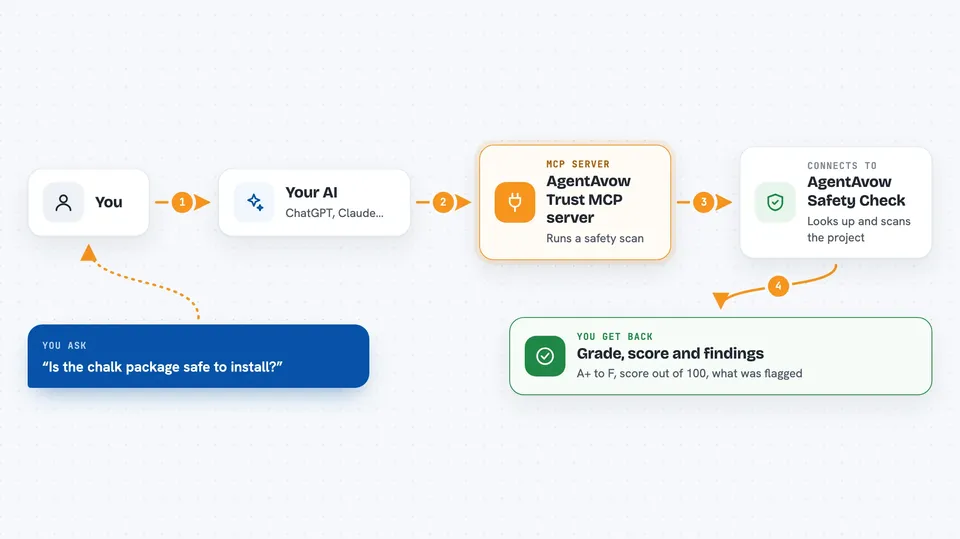
You ask your AI something like "is the chalk package safe?" Your AI sends that question to the AgentAvow helper. The helper looks up the project and runs a safety scan on it. It checks things like whether secrets are left in the code, how the code behaves, and what it depends on. Then it hands back a grade, a score, and a short list of what it found, and your AI tells you the result in the chat.
 Click to zoom
What you can do with it
- Get a letter grade for an MCP server before you connect it
- Check an npm or PyPI package before you install it
- Scan a GitHub project and see what was flagged
- See the exact line or file each finding points to
- Compare the safety scores of two tools side by side
- Look up a wallet address and scan the project it links to
- Ask for a fresh scan when you want the latest result
Try asking your AI
- “Scan the npm package chalk and tell me its safety grade”
- “Is this MCP server safe to connect? Here is its GitHub link”
- “What did the last scan of that repo find?”
- “Give me a fresh scan of this package, not the cached one”
What it gives back to you
You get a letter grade from A+ down to F, plus a number score out of 100. You also get a short list of findings, each with a severity level and a pointer to the exact line or file. Your AI sums this up in the chat, so you can decide whether to go ahead. Every result also comes with a signed proof you can check later if you want.
Before you start
What you need
- Nothing to install if you use the hosted version
- An AI app that can connect to MCP servers, like Claude or Cursor
Good to know
The hosted server is read-only and does not change anything, but a scan is a snapshot in time, so a project can change after it was graded.
Install it with your AI
Add AgentAvow Trust MCP server to your AI, no technical skills needed
You don't install anything by hand. You copy one prompt, paste it into an AI that can work on your computer, and it checks, installs and connects the server for you, asking you when it needs something.
Sign in to get the install prompt
Members get a ready-made prompt that lets the Claude desktop app check AgentAvow Trust MCP server, install it and connect it for them, step by step. You don't need any technical skills: you copy, paste and answer a few questions. Your connected AI can also find and install any of the 4,609 MCP servers here for you.
Who it's for
Anyone who connects AI tools and add-ons at work and wants a quick safety check before saying yes.