MCP server · Research · official
AIsa MCP server
by AIsa-public · official
Lets your AI look up SEO, finance, social and web data from many providers and run the searches for you.
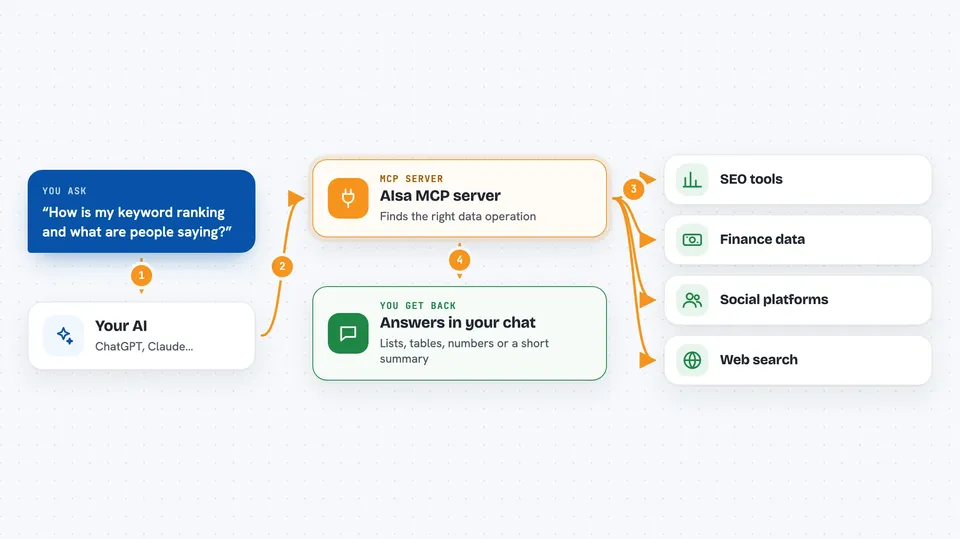
AIsa is a service that gathers data from many places: search engines, social media, finance sites, SEO tools and more. This MCP server connects your AI to all of that through one link. It is handy if you research markets, check how a website ranks, or pull numbers and posts together without opening ten different sites.
What is an MCP server? The 30-second version
On its own, your AI can only chat with you. An MCP server is a small helper that gives your AI a new skill or a connection to another service. This one connects your AI to AIsa, which sits in front of many data providers. Once it is connected, you can ask a question in plain words and the AI goes off to AIsa, finds the right data tool, runs it, and brings the answer back to your chat.
What this MCP server does
You ask your AI something like how a keyword is ranking or what people are saying about a brand. The AI uses this helper to search AIsa's catalogue of data operations and picks the one that fits. The helper then runs that operation on AIsa, which talks to the actual provider behind it, such as an SEO tool or a social platform. The result comes back into your chat as a list, a table or a short summary. You can also set a spending cap so nothing runs if it costs more than you allow.
 Click to zoom
What you can do with it
- Search across hundreds of data operations by describing what you need
- Look up SEO data such as keyword rankings and backlinks
- Check finance numbers like stock or crypto prices
- Pull posts and profiles from social platforms
- Run web searches and scrape pages for content
- Run several operations at once in a single batch
- Set a maximum price per call so nothing surprises you
Try asking your AI
- “Find the top ranking pages for the keyword project management software”
- “What is the current price of Bitcoin and how has it moved this week”
- “Show me recent Reddit posts mentioning our brand name”
- “Search the web for recent articles about remote work trends and summarise them”
What it gives back to you
You get answers written into your chat: lists of results, short summaries, numbers, or tables depending on what you asked. For example, a keyword lookup might come back as a ranked list of pages with their positions. A finance query might return a price and a small chart of recent values. The AI shows you what it found and can explain it in plain words.
Before you start
What you need
- An AI client that supports MCP, such as Claude, Cursor or VS Code
- An AIsa account for paid calls, created during the one-time browser sign-in
- A balance or subscription on AIsa if you want to run paid operations
Good to know
Paid operations cost money per call, so set a sensible maximum price and keep an eye on your AIsa balance.
Install it with your AI
Add AIsa MCP server to your AI, no technical skills needed
You don't install anything by hand. You copy one prompt, paste it into an AI that can work on your computer, and it checks, installs and connects the server for you, asking you when it needs something.
Sign in to get the install prompt
Members get a ready-made prompt that lets the Claude desktop app check AIsa MCP server, install it and connect it for them, step by step. You don't need any technical skills: you copy, paste and answer a few questions. Your connected AI can also find and install any of the 4,361 MCP servers here for you.
Who it's for
Marketers, SEO specialists, analysts, sales researchers and anyone who needs to gather data from many online sources without juggling separate tools.