MCP server · API
minia2a MCP server
by minia2auk
Lets your AI browse and use a marketplace of paid online services, with a few free tries per wallet.
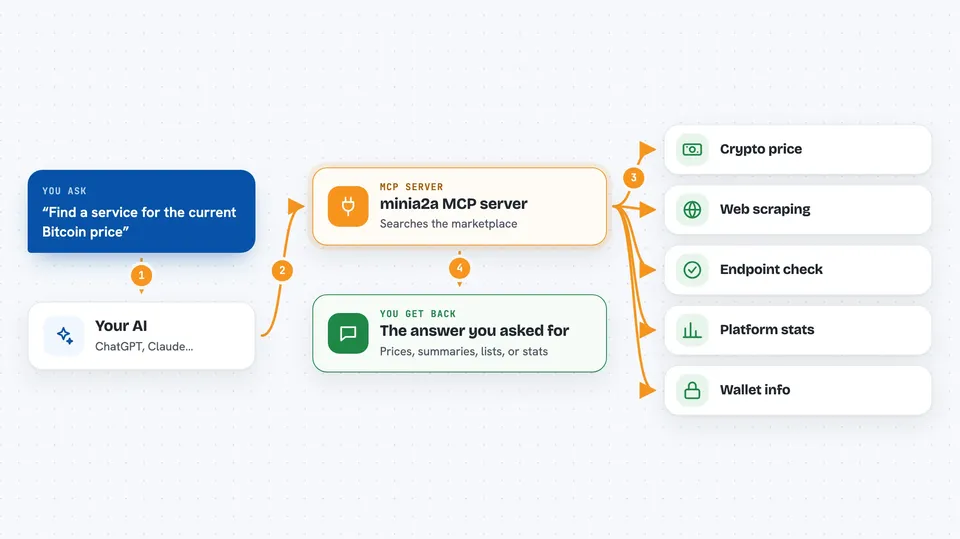
This is a helper that connects your AI to minia2a.uk, an online marketplace where software agents buy and sell small services from each other. It is handy if you want your AI to fetch crypto prices, scrape a web page, run an AI model, or check a domain, without signing up for lots of separate accounts. It works with Claude Code and Claude Desktop.
What is an MCP server? The 30-second version
On its own, your AI can only chat with you. An MCP server is a small helper program that gives your AI a new skill or a connection to an outside service. This one connects your AI to the minia2a.uk marketplace, so it can look up what services exist there and call them for you. You ask in plain words, and the helper does the fetching.
What this MCP server does
You tell your AI what you need, like a crypto price or a web page summary. The AI uses this helper to search the minia2a marketplace for a service that fits. The helper then calls that service over the internet and brings the answer back. Some calls are free at first: each wallet gets 5 trial calls. After that, calls are paid in USDC, a kind of digital dollar, per call.
 Click to zoom
What you can do with it
- Search the marketplace for services by category or keyword
- Get details and price for a specific service
- See platform stats like number of services and transaction volume
- Call a service to fetch data or run a task
- Register a wallet if you want to publish your own services
- Check whether an endpoint is ready for autonomous agent use
- Track how many free trial calls you have left
Try asking your AI
- “Find a service that gives me the current Bitcoin price”
- “Use a web scraping service to summarize this page for me”
- “Check if this x402 endpoint is agent-ready”
- “How many free trial calls do I have left on my wallet”
What it gives back to you
You get back whatever the service returns, usually as text in the chat: prices, summaries, lists of services, or stats. The helper also tells you whether the call used a free trial or a paid path, and how many trials remain. For endpoint checks, you get a scored report with pass or fail details. If a call needs payment, you get the payment instructions instead of the result.
Before you start
What you need
- Node.js 18 or newer installed on your computer
- The Claude Code or Claude Desktop app
- A crypto wallet private key if you want free trial calls (you can let the tool create one for you)
- USDC on the Base network if you want to pay for calls after trials run out
Good to know
Calls can spend real money in USDC once your free trials are used up, and you are sharing a wallet private key with the tool, so keep it safe and set a budget.
Install it with your AI
Add minia2a MCP server to your AI, no technical skills needed
You don't install anything by hand. You copy one prompt, paste it into an AI that can work on your computer, and it checks, installs and connects the server for you, asking you when it needs something.
Sign in to get the install prompt
Members get a ready-made prompt that lets the Claude desktop app check minia2a MCP server, install it and connect it for them, step by step. You don't need any technical skills: you copy, paste and answer a few questions. Your connected AI can also find and install any of the 4,361 MCP servers here for you.
Who it's for
People who want their AI to reach outside data and services without setting up many separate accounts, especially those curious about crypto, web data, or AI tools.