MCP server · Music
Utopia MCP server
by altinoren
Let your AI practice running a pretend smart home, from lights and locks to a robot vacuum and an electric car.
Utopia is a pretend smart home that your AI can play with. It comes with fake devices like lights, blinds, a thermostat, a door lock, a robot vacuum, a fridge, a car, and even a bank and a grocery store. It is handy if you want to see how well your AI can figure out a task on its own, without you spelling out every step.
What is an MCP server? The 30-second version
On its own, your AI can only chat with you. An MCP server is a small helper program that gives your AI a new skill or a connection to something. This one connects your AI to a simulated house full of devices, so when you ask it to get the house ready for bed, it can actually look at those devices and change them. Nothing here is real, it is all a practice world, but the AI does not know that.
What this MCP server does
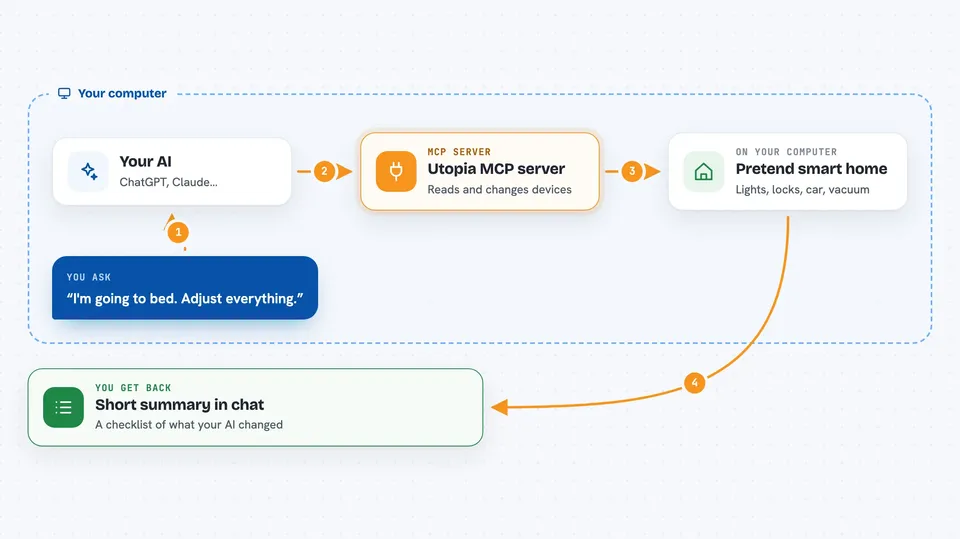
You type a request in plain words, like getting the house ready for the night. Your AI reads that request, then uses this helper to look at the pretend devices in the house. The helper reports back things like which lights are on, whether the front door is locked, or what is in the fridge. Your AI then decides what to change and tells the helper to do it. At the end you get a short summary in the chat of what it adjusted.
 Click to zoom
What you can do with it
- Turn lights on or off in any room
- Close or schedule the smart blinds
- Set and check the temperature in a room
- Lock or unlock the front door
- Start or check the robot vacuum
- Play music in one or more rooms
- Send the pretend electric car somewhere or start charging it
Try asking your AI
- “I'm going to bed. Adjust everything by using the available tools.”
- “It feels stuffy in the living room. Check the air quality and humidity and fix it if needed.”
- “Look in the fridge and tell me what we are low on, then check my grocery history.”
- “Send the car to the office and make sure it is charged before I leave.”
What it gives back to you
You get a short written summary in the chat, like a checklist of what your AI changed. It can also show you lists, such as the rooms in the house, the current temperature, or what is inside the fridge. Sometimes it just answers a question, like whether the front door is locked. Nothing it reports is real, it is all made up for practice.
Before you start
What you need
- The Claude desktop app
- .NET 9 installed on your computer
- The Utopia project files downloaded from GitHub
Good to know
Everything here is simulated, so nothing you do affects a real home, but the bank and grocery tools are also pretend, so do not treat any numbers from them as real.
Install it with your AI
Add Utopia MCP server to your AI, no technical skills needed
You don't install anything by hand. You copy one prompt, paste it into an AI that can work on your computer, and it checks, installs and connects the server for you, asking you when it needs something.
Sign in to get the install prompt
Members get a ready-made prompt that lets the Claude desktop app check Utopia MCP server, install it and connect it for them, step by step. You don't need any technical skills: you copy, paste and answer a few questions. Your connected AI can also find and install any of the 4,066 MCP servers here for you.
Who it's for
People who want to test how well an AI can plan and carry out a multi-step task on its own, without any coding.