MCP server · Notes · official
GROWI MCP server
by growilabs · official
Lets your AI search, read, and update pages in your GROWI wiki for you.
This is a helper that connects your AI assistant to GROWI, the wiki where your team keeps its notes and documents. Once it is set up, you can just ask your AI to find a page, read it, or write something new, and it will do the looking and typing in GROWI for you. It is handy if your team lives in GROWI and you would rather ask a question than click around.
What is an MCP server? The 30-second version
On its own, your AI can only chat with you. An MCP server is a small helper program that gives your AI a new skill or a connection to an app. This one connects your AI to GROWI, so it can look things up and make changes there when you ask. Think of it as giving your assistant a key to the wiki, but only doing what you tell it to.
What this MCP server does
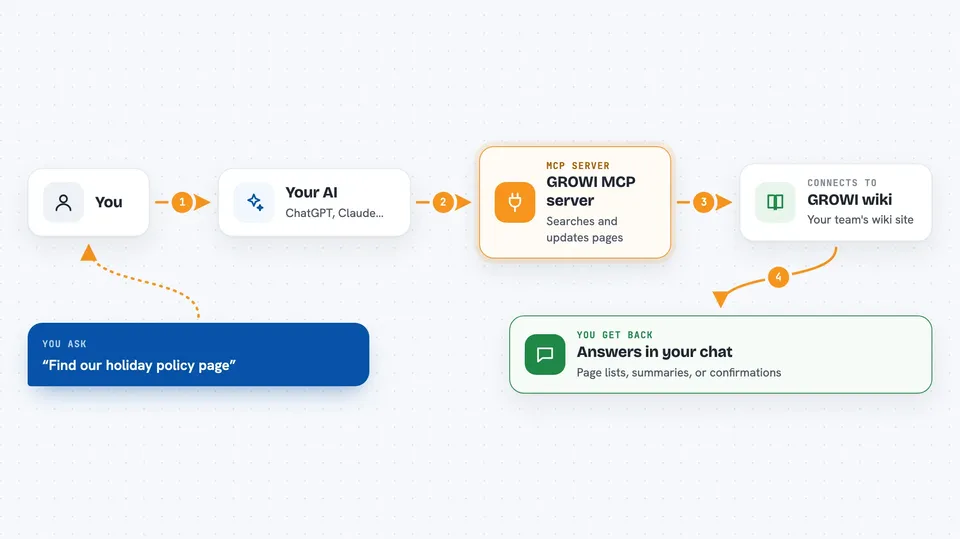
You ask your AI something in plain words, like find the page about our holiday policy. The AI passes that request to this helper, which talks to your GROWI site using its official connection. GROWI sends back the pages, tags, comments, or history that match. The AI then reads that and answers you in the chat, or makes the change you asked for, like adding a comment or creating a page.
 Click to zoom
What you can do with it
- Search your GROWI wiki for pages by keyword
- Read a full page, or just one section or heading outline
- Create, update, rename, duplicate, or delete pages
- Add, list, or remove comments on a page
- Look at and change tags on pages
- Check a page's edit history and see what changed
- Create or remove share links for a page
What it gives back to you
You get answers in the chat: a list of matching pages with their names and links, a summary of what a page says, or the tags and comments on it. If you asked it to change something, it tells you what it did, like the new revision of a page or a confirmation that a comment was added. For searches, it usually shows the page titles first so you can pick the right one.
Before you start
What you need
- A GROWI account on a wiki you can access
- An API token from your GROWI account (a kind of password for apps; you create it in your GROWI settings)
- The web address of your GROWI site
- Node.js 18 or newer if you install it yourself
Good to know
It can change your wiki, including deleting pages and comments, so double check before you say yes to anything that removes content.
Install it with your AI
Add GROWI MCP server to your AI, no technical skills needed
You don't install anything by hand. You copy one prompt, paste it into an AI that can work on your computer, and it checks, installs and connects the server for you, asking you when it needs something.
Sign in to get the install prompt
Members get a ready-made prompt that lets the Claude desktop app check GROWI MCP server, install it and connect it for them, step by step. You don't need any technical skills: you copy, paste and answer a few questions. Your connected AI can also find and install any of the 4,361 MCP servers here for you.
Who it's for
Teams that keep their notes and documents in GROWI and want to ask their AI to find or update things there without clicking through the wiki.