MCP server · Music
Spotify MCP server
by imprvhub
Lets your AI search Spotify, control playback, and manage your playlists for you.

This is a small helper that connects Claude Desktop to your Spotify account. Once it is set up, you can ask Claude in plain words to find songs, play or pause music, and tidy up your playlists. It is handy if you listen to Spotify all day and would rather type a request than click around the app.
What is an MCP server? The 30-second version
On its own, your AI can only chat with you. An MCP server is a small helper program that gives your AI one new skill, in this case a connection to Spotify. You install it once, and from then on Claude can look things up in Spotify or make changes there when you ask. Think of it as giving Claude a pair of hands for your music account.
What this MCP server does
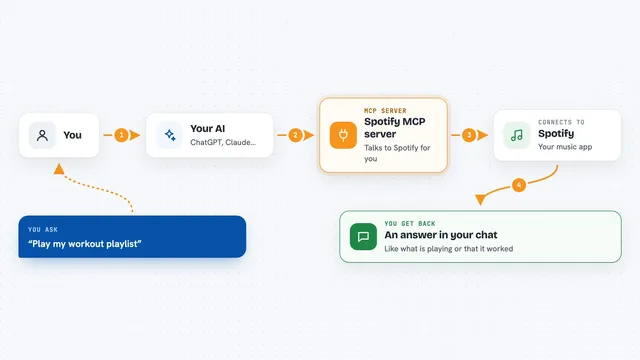
You type a request in Claude, like asking it to find a song or play something. Claude passes that request to this helper program running quietly in the background. The helper talks to Spotify using your account and your permission. Spotify sends back the answer, and Claude shows it to you in the chat, or carries out the action like pausing the music. You never have to open the Spotify app yourself.
 Click to zoom
What you can do with it
- Search Spotify for tracks, albums, artists, and playlists
- Play a specific track, pause, skip to the next song, or go back
- See what is playing right now
- List your playlists and read the songs inside them
- Create a new playlist, rename it, or change whether it is public
- Add or remove tracks, and reorder songs in a playlist
- See your top tracks and what you listened to recently
Try asking your AI
- “Find me some upbeat jazz playlists on Spotify”
- “What am I listening to right now?”
- “Pause the music”
- “Add these three songs to my workout playlist”
- “What were my most played tracks this month?”
What it gives back to you
You get answers written in the chat, like a list of matching songs with their artists, or a summary of your top tracks. When you ask it to change something, like adding songs to a playlist, it tells you what it did. Playback commands simply report back that the music was paused, skipped, or started.
Before you start
What you need
- A Spotify account (free or paid)
- The Claude Desktop app
- Node.js 20 or higher installed on your computer
- Spotify API credentials (a Client ID and Client Secret from Spotify's developer site; it is free and takes a few minutes)
Good to know
It can change your playlists and control what is playing, so check what you ask it to do before approving, and know that removing a playlist only unfollows it, the playlist itself still exists on Spotify.
Install it with your AI
Add Spotify MCP server to your AI, no technical skills needed
You don't install anything by hand. You copy one prompt, paste it into an AI that can work on your computer, and it checks, installs and connects the server for you, asking you when it needs something.
Sign in to get the install prompt
Members get a ready-made prompt that lets the Claude desktop app check Spotify MCP server, install it and connect it for them, step by step. You don't need any technical skills: you copy, paste and answer a few questions. Your connected AI can also find and install any of the 4,066 MCP servers here for you.
Who it's for
People who use Spotify a lot and want to control it or manage playlists by just asking Claude in plain words.