MCP server · Productivity · official
htmldrop MCP server
by vin-spiegel · official
Turn HTML, Markdown, PDFs or images your AI creates into a shareable web link with an expiry date.
htmldrop is a service that takes a file or a chunk of content and gives you back a web link you can send to anyone. This MCP server connects your AI assistant to htmldrop, so when your AI writes a report, a chart or a small dashboard, it can publish it for you in one step. It is handy for anyone who wants to share what their AI made without emailing files around or setting up a website.
What is an MCP server? The 30-second version
On its own, your AI can only chat with you inside the app. An MCP server is a small helper program that gives your AI a new skill or a connection to another service. This one connects your AI to htmldrop, so the AI can hand your content over to htmldrop and get a live link back. You do not install anything for the hosted version: you just add the address of the server once, and your AI gains the ability to publish.
What this MCP server does
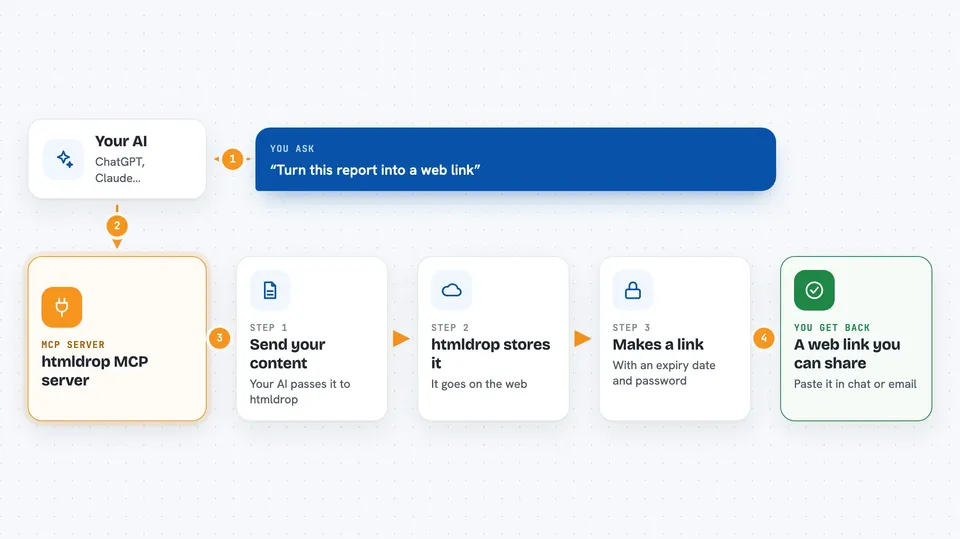
You ask your AI to publish something, for example a report it just wrote or an HTML file you have. The AI uses this helper to send the content to htmldrop. htmldrop stores it and creates its own little web address, like happy-otter-42.htmldrop.link. It also builds a preview card so the link looks nice when you paste it into chat or email. Then the AI tells you the link, and you can share it with anyone. Links expire after a set number of days, so old things do not pile up forever.
 Click to zoom
What you can do with it
- Publish an HTML report your AI just built and get a shareable link
- Turn a Markdown document into a clean reader page on the web
- Publish a PDF or an image file and get a link to it
- Set an expiry date so the link stops working after a while
- Add a password to a link so only the right people can open it
- Fetch an existing web page and republish it as your own link
- Give the link a title so the preview card looks right when shared
Try asking your AI
- “Publish this report as a web page and give me the link”
- “Turn this Markdown summary into a shareable page that expires in 3 days”
- “Upload this chart image and send me the link”
- “Publish this dashboard HTML with the password team2025”
What it gives back to you
You get back a web link you can click or paste anywhere. The AI usually also tells you the expiry date and, if you set one, that the link is password protected. If something went wrong, you get a short message explaining it instead of a link.
Before you start
What you need
- An AI app that supports MCP servers, such as Claude Code, Claude Desktop, Cursor or Codex CLI
- For Claude Desktop and Codex CLI, Node.js installed so the mcp-remote bridge can run
Good to know
Anything you publish gets a public web address, so do not publish private or sensitive content unless you set a password, and remember that links expire after the number of days you choose.
Install it with your AI
Add htmldrop MCP server to your AI, no technical skills needed
You don't install anything by hand. You copy one prompt, paste it into an AI that can work on your computer, and it checks, installs and connects the server for you, asking you when it needs something.
Sign in to get the install prompt
Members get a ready-made prompt that lets the Claude desktop app check htmldrop MCP server, install it and connect it for them, step by step. You don't need any technical skills: you copy, paste and answer a few questions. Your connected AI can also find and install any of the 4,361 MCP servers here for you.
Who it's for
Anyone who uses an AI assistant to make reports, charts or small web pages and needs a quick way to share them, especially analysts, marketers and developers who do not want to set up hosting.