MCP server · Chat
Unichat MCP server
by amidabuddha
Lets your AI send questions to other AI models like OpenAI, Anthropic, Mistral, Google and DeepSeek.
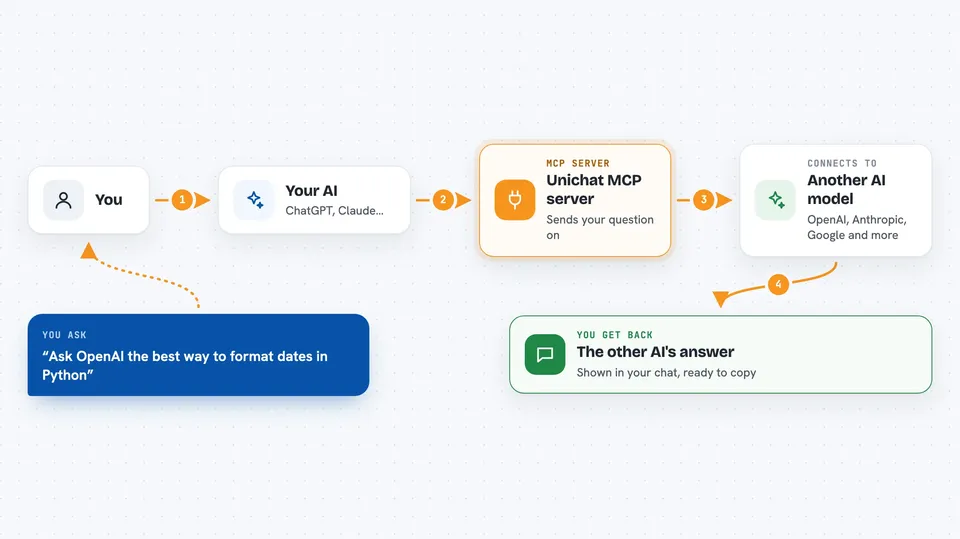
This is a small helper that lets your AI assistant talk to other AI services, such as OpenAI, Anthropic, Mistral, xAI, Google AI or DeepSeek. You set it up once with your own key for the service you want, and after that you can ask your AI to send a question there and bring the answer back. It is handy if you like one assistant for chatting but want a second opinion from a different model.
What is an MCP server? The 30-second version
On its own, your AI can only chat with you using what it already knows. An MCP server is a small helper program that gives your AI a new skill or a connection to another app or service. This particular helper connects your AI to other AI providers, so when you ask a question it can pass that question along and bring the reply back. You do not need to understand how it works inside; you just add it once and then talk to your AI as usual.
What this MCP server does
You type a request in your AI chat, like asking it to check a piece of code or to get an answer from another model. Your AI then uses this helper, which sends your request to the AI provider you set up, such as OpenAI or Anthropic. That provider writes an answer, and the helper hands it back to your AI. Your AI then shows you the answer in the chat, as if it had written it itself. It also comes with a few ready-made prompts for common code tasks.
 Click to zoom
What you can do with it
- Send a question to another AI model and get its answer back
- Ask a second model to review a piece of code
- Get an explanation of how some code works
- Ask for documentation and comments to be added to code
- Request changes to be applied to a piece of code
- Switch between providers by changing one setting
Try asking your AI
- “Ask OpenAI what the best way is to format dates in Python”
- “Use the code review prompt on this function and tell me what to improve”
- “Explain what this piece of code does, step by step”
- “Add comments and docstrings to this code”
What it gives back to you
You get back text answers from the AI provider you chose, shown right in your chat. For code prompts, you get a review, an explanation, updated code with comments, or a reworked version of your code. It is all plain text you can read and copy. Nothing is saved anywhere by this helper; it just passes messages back and forth.
Before you start
What you need
- The Claude desktop app or another app that supports MCP servers
- An API key from the AI provider you want to use, such as OpenAI or Anthropic (a kind of password for apps; the provider's website gives you one)
- The name of the model you want to use, for example gpt-5.4-mini
Good to know
Using it sends your text to another AI provider, so do not paste anything private or secret, and remember that provider may charge you for each request.
Install it with your AI
Add Unichat MCP server to your AI, no technical skills needed
You don't install anything by hand. You copy one prompt, paste it into an AI that can work on your computer, and it checks, installs and connects the server for you, asking you when it needs something.
Sign in to get the install prompt
Members get a ready-made prompt that lets the Claude desktop app check Unichat MCP server, install it and connect it for them, step by step. You don't need any technical skills: you copy, paste and answer a few questions. Your connected AI can also find and install any of the 4,361 MCP servers here for you.
Who it's for
People who already use an AI assistant and want to reach a second AI model for reviews, explanations or a different opinion, without leaving their chat.