
MCP server · Finance and crypto · official
Wealthville MCP server
by amitesh-m · official
Ask your AI for Enter, Hold or Exit verdicts and scores on Solana and EVM liquidity pools.
This is an official helper from Wealthville that lets your AI look up scores and verdicts for crypto liquidity pools. It is handy if you are thinking about putting money into a pool and want a plain Enter, Hold or Exit answer instead of digging through charts yourself.
What is an MCP server? The 30-second version
On its own, your AI can only chat with you. An MCP server is a small helper program that gives your AI a new skill or a connection to an app or service. This one connects your AI to Wealthville's public data about liquidity pools. Once it is set up, you can just ask your AI a question and it will fetch the answer from Wealthville for you.
What this MCP server does
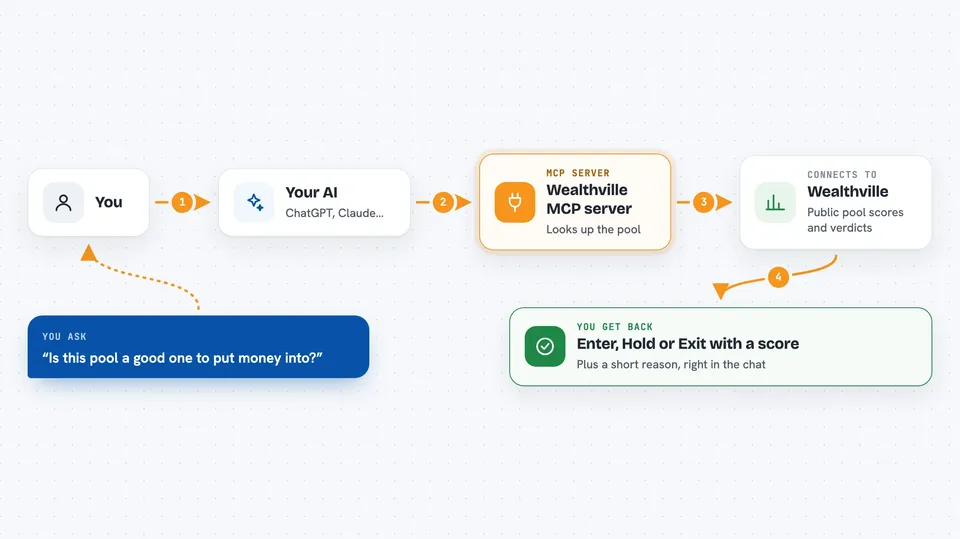
You ask your AI something like whether a certain pool is a good one to put money into. Your AI passes that question to this helper program. The helper talks to Wealthville's public data service and pulls back the score and verdict for that pool. Your AI then explains the result to you in the chat. You never have to open a website or copy numbers around yourself.
 Click to zoom
What you can do with it
- Check the Enter, Hold or Exit verdict for a specific pool
- See the Wealthville Score from 0 to 100 for a pool
- List the top-scoring pools right now
- Look at recent signals Wealthville has published
- Read the public track record, including the misses
- Compare a few pools side by side before you decide
Try asking your AI
- “Is Czfq3xZZDmsdGdUyrNLtRhGc47cXcZtLG4crryfu44zE a good pool to LP into?”
- “Show me the top 5 pools by Wealthville Score right now.”
- “What is the verdict on this Solana pool and why?”
- “How has Wealthville's track record looked over the last 30 days?”
What it gives back to you
You get back plain answers in the chat: a verdict word like Enter, Hold or Exit, a score between 0 and 100, and a short explanation. For lists, you get a ranked set of pools with their scores. For the track record, you get a summary of past signals and how they turned out. Nothing is changed anywhere, it is all read-only.
Before you start
What you need
- The Claude desktop app or another tool that supports MCP
- Node.js installed on your computer
- A free Wealthville partner key if you want a higher rate limit (optional)
Good to know
This is a data product, not financial advice, and crypto pools can lose money, so treat the verdicts as one input among many.
Install it with your AI
Add Wealthville MCP server to your AI, no technical skills needed
You don't install anything by hand. You copy one prompt, paste it into an AI that can work on your computer, and it checks, installs and connects the server for you, asking you when it needs something.
Sign in to get the install prompt
Members get a ready-made prompt that lets the Claude desktop app check Wealthville MCP server, install it and connect it for them, step by step. You don't need any technical skills: you copy, paste and answer a few questions. Your connected AI can also find and install any of the 4,361 MCP servers here for you.
Who it's for
People who put money into crypto liquidity pools and want a quick second opinion before they commit.





