MCP server · Finance and crypto · official
DexPaprika MCP server
by coinpaprika · official
Lets your AI look up live crypto token prices, liquidity pools and price history across many blockchains.

This is a small helper that connects your AI assistant to DexPaprika, a service that tracks cryptocurrency trading data on decentralized exchanges. Once it is set up, you can just ask your AI questions about tokens, pools and prices, and it will go and fetch the numbers for you. It is handy for anyone curious about crypto markets who does not want to click around charts and websites all day.
What is an MCP server? The 30-second version
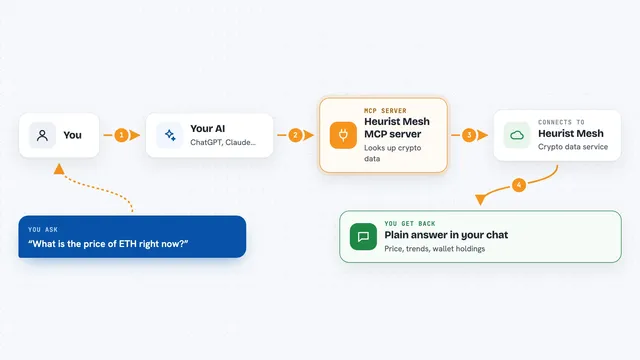
On its own, your AI can only chat with you using what it already knows. An MCP server is a small helper program that gives your AI a new skill, in this case a connection to DexPaprika's crypto data. When you ask a question, your AI passes it to this helper, the helper asks DexPaprika, and the answer comes back into your chat. You do not need to understand how it works inside, you just add it once and then talk to your AI as usual.
What this MCP server does
You ask your AI something like which pools on Ethereum have the most trading volume today. Your AI sends that request to this helper, which talks to the DexPaprika service over the internet. DexPaprika sends back the matching tokens, pools, prices or history, and the helper hands it to your AI. Your AI then writes it up for you in the chat, as a list, a table or a short summary. It only reads data, it does not trade or move any money.
 Click to zoom
What you can do with it
- Look up the current price and details of a token on a chosen blockchain
- List the biggest liquidity pools on a network by trading volume
- Find every pool that contains a particular token
- Pull historical price candles for a pool over the last day or week
- Compare trading volume between two exchanges on the same network
- Search for a token, pool or exchange by name or address
- Get recent trades in a pool to see buying and selling pressure
Try asking your AI
- “Analyze the JUP token on Solana and show me its price, volume and top pools.”
- “Show me the top 10 pools on Ethereum by 24 hour volume.”
- “Get hourly price candles for the last day for the ETH/USDT pool on Uniswap and describe the trend.”
- “Search for all pools containing the ARB token and rank them by volume.”
What it gives back to you
You get answers written in plain language, usually with a list or table of tokens, pools, prices, volumes or dates. For history requests you get rows of price candles, one per time period, which your AI can describe or turn into a simple chart. For searches you get matching names, symbols and addresses. Everything shows up right in the chat, so you can keep asking follow up questions.
Before you start
What you need
- The Claude desktop app or another app that supports MCP servers
- Node.js installed on your computer (the free version is fine)
- Internet access, since the data comes from an online service
- Nothing else to start: the free tier works without any signup or key
Good to know
It only reads public market data and cannot trade or move money, but the free tier is limited to 15 requests per minute and data can be up to a minute old, so do not treat it as a live trading feed.
Install it with your AI
Add DexPaprika MCP server to your AI, no technical skills needed
You don't install anything by hand. You copy one prompt, paste it into an AI that can work on your computer, and it checks, installs and connects the server for you, asking you when it needs something.
Sign in to get the install prompt
Members get a ready-made prompt that lets the Claude desktop app check DexPaprika MCP server, install it and connect it for them, step by step. You don't need any technical skills: you copy, paste and answer a few questions. Your connected AI can also find and install any of the 4,361 MCP servers here for you.
Who it's for
Crypto curious office workers, analysts and researchers who want quick answers about tokens and trading pools without learning a trading platform.