MCP server · Finance and crypto · official
Bitcompare MCP server
by bitcompare · official
Ask your AI for live crypto lending, staking, borrowing and stablecoin rates, plus prices and market stats.
This is a helper made by Bitcompare that plugs into your AI assistant. Once it is connected, you can just ask your AI about crypto interest rates, staking rewards, borrowing costs, coin prices and market numbers, and it will look them up for you. It is handy if you follow crypto yields or compare where to earn or borrow.
What is an MCP server? The 30-second version
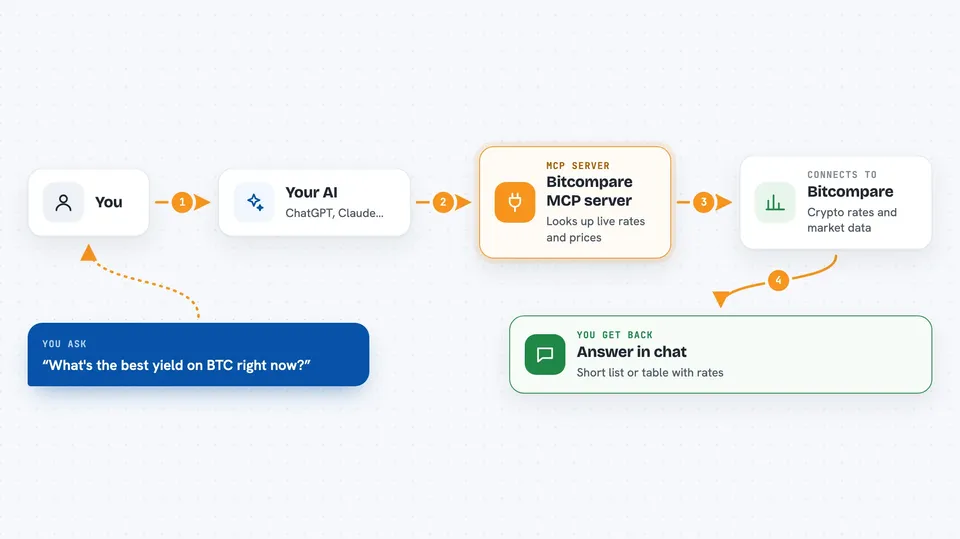
On its own, your AI can only chat with you using what it already learned. An MCP server is a small helper program that gives your AI a new skill or a connection to a service. This one connects your AI to Bitcompare, a site that tracks crypto rates and market data. So instead of guessing, your AI can ask Bitcompare for the latest numbers and answer you with real data.
What this MCP server does
You ask your AI a question in normal words, like which platform pays the most for staking a certain coin. Your AI passes that question to this helper, which talks to Bitcompare's data service. Bitcompare sends back the current or past rates, prices or market figures. Your AI then writes the answer for you in the chat, often as a short list or table. Everything is read-only, so it looks things up and never changes anything.
 Click to zoom
What you can do with it
- Compare current lending, savings and staking rates across providers
- Look up past rates to see how yields changed over time
- Check borrowing rates for a coin you want to borrow
- Get aggregated prices for a coin with odd exchange prices filtered out
- See global market stats like total market cap and the Fear and Greed Index
- Check how close stablecoins are to their peg
- Find the right coin when exchanges use different tickers like BTC or XBT
Try asking your AI
- “What's the best yield on BTC right now?”
- “Show me staking rates for ETH across providers and how they changed in the last month”
- “What is the current price of SOL and the top movers in the last 24 hours?”
- “Which stablecoins are furthest from their peg today?”
What it gives back to you
You get answers written in the chat, usually as short lists or small tables. For rates, you see provider names and percentages, sometimes with a date range if you asked about history. For prices and market stats, you see numbers like the median price or total market cap. It only reads data, so nothing in your accounts or on Bitcompare gets changed.
Before you start
What you need
- A Bitcompare Pro or Enterprise plan
- An API key from Bitcompare (starts with ck_live_; you get it from your Bitcompare dashboard)
- Node.js installed on your computer if you run it yourself, or an MCP client that can point at a web address
Good to know
It needs a paid Bitcompare plan, and it only reads data, so it will not change anything for you.
Install it with your AI
Add Bitcompare MCP server to your AI, no technical skills needed
You don't install anything by hand. You copy one prompt, paste it into an AI that can work on your computer, and it checks, installs and connects the server for you, asking you when it needs something.
Sign in to get the install prompt
Members get a ready-made prompt that lets the Claude desktop app check Bitcompare MCP server, install it and connect it for them, step by step. You don't need any technical skills: you copy, paste and answer a few questions. Your connected AI can also find and install any of the 4,361 MCP servers here for you.
Who it's for
People who follow crypto yields, compare lending or staking options, or keep an eye on prices and stablecoins, and want quick answers from their AI.