MCP server · Developer tools
MCP Installer server
by anaisbetts
Lets your AI add new MCP servers for you, so you do not have to edit config files by hand.

This is a small helper that lets your AI install other MCP servers for you. Instead of opening a config file and copying lines around, you just ask in plain words. It is handy if you keep hearing about useful MCP servers and want an easier way to add them.
What is an MCP server? The 30-second version
On its own, your AI can only chat. An MCP server is a small helper program that gives your AI a new skill or a connection to an app. This particular helper gives your AI one skill: adding other MCP servers to your setup. So you ask, and the AI does the fiddly config work for you.
What this MCP server does
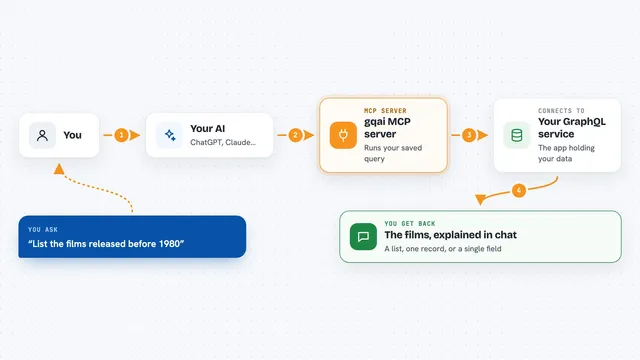
You tell your AI which MCP server you want, using its name or its package name. The AI passes that request to this installer helper. The helper then adds that server to your Claude desktop configuration, and for node or Python servers it uses npx or uv behind the scenes. When it is done, the new server is set up and ready to use after you restart Claude. You never have to open the config file yourself.
 Click to zoom
What you can do with it
- Install an MCP server by its name
- Install an MCP server by its npm or PyPI package name
- Install a server from a folder on your own computer
- Pass arguments to a server, like a folder path it should use
- Set environment variables for a server, like an access token
- Add several servers in one sitting without editing files
Try asking your AI
- “Hey Claude, install the MCP server named mcp-server-fetch”
- “Install the @modelcontextprotocol/server-filesystem package as an MCP server, and use my Desktop folder as the argument”
- “Please install the MCP server in my code folder called mcp-youtube”
- “Install @modelcontextprotocol/server-github and set the token environment variable to my personal token”
What it gives back to you
You get a short confirmation in the chat that the server was added, usually with the name of the server and where it was written. If something goes wrong, like a missing tool or a wrong package name, you get an error message instead. There is no long report, just a simple yes or no. After that you restart Claude and the new server shows up.
Before you start
What you need
- The Claude desktop app
- Node.js with npx for node-based servers
- uv for Python-based servers
- The name or package name of the MCP server you want to add
Good to know
It changes your Claude configuration file and can add servers that run on your computer, so only ask it to install servers you trust.
Install it with your AI
Add MCP Installer server to your AI, no technical skills needed
You don't install anything by hand. You copy one prompt, paste it into an AI that can work on your computer, and it checks, installs and connects the server for you, asking you when it needs something.
Sign in to get the install prompt
Members get a ready-made prompt that lets the Claude desktop app check MCP Installer server, install it and connect it for them, step by step. You don't need any technical skills: you copy, paste and answer a few questions. Your connected AI can also find and install any of the 4,609 MCP servers here for you.
Who it's for
People who use Claude desktop and want to try new MCP servers without hand-editing config files.