MCP server · Developer tools
Code Declaration Lookup MCP server
by osinmv
Lets your AI search code files for function and class names and show you where they are.

This is a small helper that lets your AI search through a folder of code and find where functions, classes, and other named parts are defined. It is handy if you work with a large codebase and keep asking yourself where something lives. You do not need to be a programmer to set it up, but it is mostly useful for people who read or write code.
What is an MCP server? The 30-second version
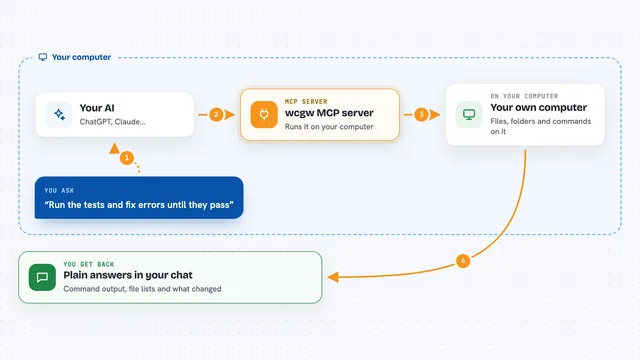
On its own, your AI can only chat with you. An MCP server is a small helper program that gives your AI a new skill or a connection to something else. This one connects your AI to an index of your code files, so it can look up names and locations for you. You ask a question, and the helper does the searching behind the scenes.
What this MCP server does
First you point this helper at a folder of code, and it builds a searchable index of the names inside. Then, when you ask your AI something like where a function is defined, the AI sends that question to this helper. The helper looks through its index and finds matching names. Your AI then tells you the file and the line where each match lives. If you add new code later, you can ask the AI to index that folder too.
 Click to zoom
What you can do with it
- Find where a function or class is defined
- List all the code files that have been indexed
- See every function inside one specific file
- Search by part of a name, not just the full name
- Add a new folder of code to the index
- Check which APIs or code collections are already indexed
Try asking your AI
- “Where is the function called parse_config defined?”
- “List all the functions in src/utils.py”
- “Search for anything with user in the name”
- “Index the folder at /home/me/project/include”
What it gives back to you
You get back a list of matches. Each match shows the name, the kind of thing it is (like a function or a class), the file it is in, and the line number. Your AI can then summarize those results or point you to the exact spot. If nothing matches, it will tell you that too.
Before you start
What you need
- Python 3.13 installed on your computer
- Universal Ctags 6.2.0 installed
- The Claude desktop app or another AI tool that supports MCP servers
Good to know
It only reads code files, it does not change them, but be careful about indexing folders that contain private or secret code if you share your AI chats with others.
Install it with your AI
Add Code Declaration Lookup MCP server to your AI, no technical skills needed
You don't install anything by hand. You copy one prompt, paste it into an AI that can work on your computer, and it checks, installs and connects the server for you, asking you when it needs something.
Sign in to get the install prompt
Members get a ready-made prompt that lets the Claude desktop app check Code Declaration Lookup MCP server, install it and connect it for them, step by step. You don't need any technical skills: you copy, paste and answer a few questions. Your connected AI can also find and install any of the 4,361 MCP servers here for you.
Who it's for
Developers and anyone who reads code and wants quick answers about where things are defined.