MCP server · Developer tools
Everything MCP server (test server)
A practice server that shows your AI a sample of every trick an MCP connection can do.
This is a demo MCP server made by the people who build the MCP standard. It is not meant to do real work. It is a test server, so builders of AI apps can check that their app handles every kind of MCP feature correctly. If you are just an everyday user, this is mostly a way to see what an MCP connection can look like in action.
What is an MCP server? The 30-second version
On its own, your AI can only chat with you. An MCP server is a small helper program that gives your AI a new skill or a connection to something outside the chat. This one is a sample helper that shows off all the different kinds of skills an MCP server can offer, like prompts, tools, and resources. Think of it as a showroom rather than a real shop: it exists so app builders can test their setup against every feature at once.
What this MCP server does
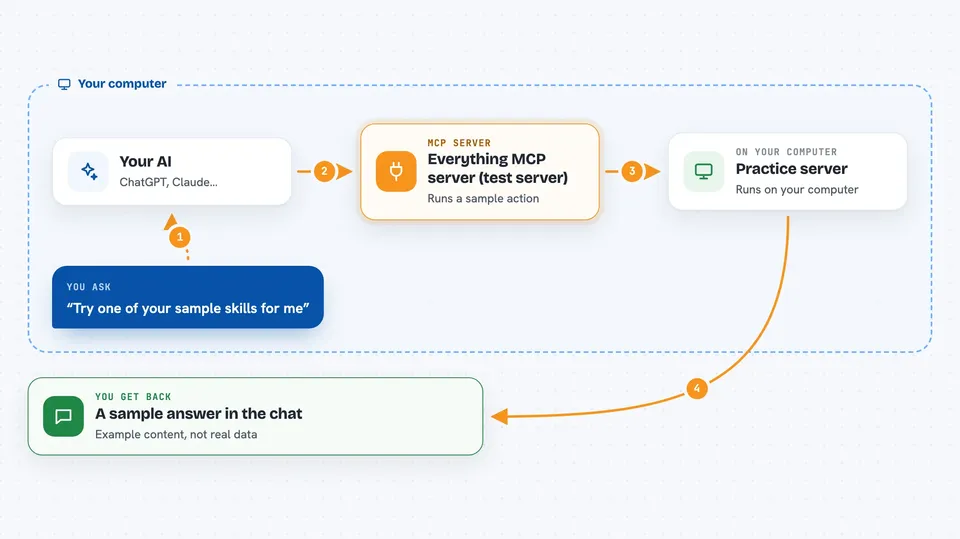
You connect this server to your AI app, and the app now sees a set of sample skills to try. You ask your AI to use one of them, and the AI passes that request to this helper program. The helper runs the sample action and sends the result back to your AI. Your AI then shows you the result in the chat. Nothing here connects to a real service, so the answers are just examples.
 Click to zoom
What you can do with it
- Try out sample prompts the server offers
- Run sample tools to see how tool calls look
- Read sample resources the server exposes
- See how a server can ask your AI to do something back
- Test that your MCP app handles every feature type
- Check error handling with a deliberately failing example
What it gives back to you
You get back whatever the sample action produces: a list of prompts, a short text answer, a sample resource, or an error message on purpose. Everything shows up in the chat like a normal reply from your AI. Since this is a test server, the content is not real data, just examples.
Before you start
What you need
- An AI app that supports MCP servers, like the Claude desktop app or VS Code
- Node.js installed on your computer (the free program that runs this server)
Good to know
This is a test server, so do not rely on its answers for real work.
Install it with your AI
Add Everything MCP server (test server) to your AI, no technical skills needed
You don't install anything by hand. You copy one prompt, paste it into an AI that can work on your computer, and it checks, installs and connects the server for you, asking you when it needs something.
Sign in to get the install prompt
Members get a ready-made prompt that lets the Claude desktop app check Everything MCP server (test server), install it and connect it for them, step by step. You don't need any technical skills: you copy, paste and answer a few questions. Your connected AI can also find and install any of the 4,361 MCP servers here for you.
Who it's for
This is mainly for people building or testing MCP apps, not for everyday office work.