
MCP server · Developer tools
gqai MCP server
by fotoetienne
Turn your GraphQL queries into tools your AI can run, so it can fetch live data for you.
gqai is a small helper that takes the GraphQL queries you already have and turns them into tools your AI can use. If your team has a GraphQL service and you want your AI to pull real answers from it, this connects the two. It is most useful for developers and technical folks who already work with GraphQL.
What is an MCP server? The 30-second version
On its own, your AI can only chat with you using what it already knows. An MCP server is a small helper program that gives your AI a new skill or a connection to an app or service. This one connects your AI to a GraphQL service, so it can look things up there when you ask. You set it up once, and after that your AI can call those queries for you.
What this MCP server does
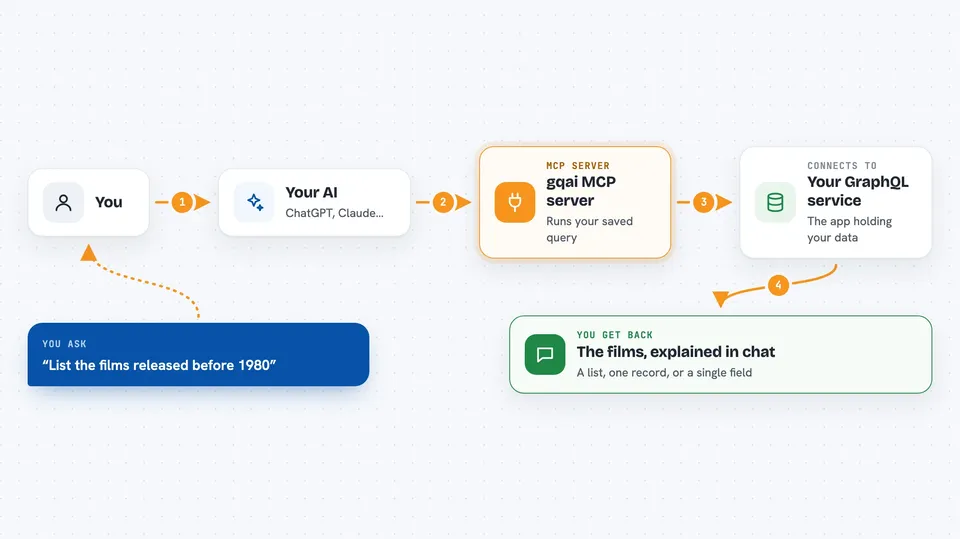
You write your queries in plain GraphQL files, and gqai reads them and turns each one into a tool. When you ask your AI something, the AI picks the right tool and asks gqai to run it. gqai sends that query to your GraphQL service and gets the answer back. Then your AI shows you the result in the chat, in normal words or as a list. You do not write any extra code for this; your existing queries do the work.
 Click to zoom
What you can do with it
- Look up records from your GraphQL service by asking in plain words
- Run a saved query and show you the results in the chat
- Pass values like an ID or a name into a query
- Reuse your existing GraphQL files as AI tools
- Test any tool yourself from the command line before your AI uses it
- Keep your login tokens out of the config by using environment variables
Try asking your AI
- “Get all the films and show me their titles and episode numbers”
- “Find the film with ID 1 and tell me who directed it”
- “List the films released before 1980”
- “Look up the film called A New Hope and give me its release date”
What it gives back to you
You get back the answer from your GraphQL service, shown in the chat. That can be a list of items, a single record, or specific fields like a title or a date. gqai prints the raw result, and your AI explains it to you in normal words.
Before you start
What you need
- A working GraphQL service with a live address (not just a schema file)
- The gqai program installed on your computer
- A .graphqlrc.yml file that points to your service and your query files
- Login tokens if your service needs them, set as environment variables
Good to know
The tools come from your own GraphQL queries, so if any of them change or delete data, your AI can do that too when asked.
Install it with your AI
Add gqai MCP server to your AI, no technical skills needed
You don't install anything by hand. You copy one prompt, paste it into an AI that can work on your computer, and it checks, installs and connects the server for you, asking you when it needs something.
Sign in to get the install prompt
Members get a ready-made prompt that lets the Claude desktop app check gqai MCP server, install it and connect it for them, step by step. You don't need any technical skills: you copy, paste and answer a few questions. Your connected AI can also find and install any of the 4,361 MCP servers here for you.
Who it's for
Developers and technical teams who already have a GraphQL service and want their AI to query it.


