MCP server · Developer tools
Desktop Insights MCP server
Ask your AI which SDKs, frameworks and tools real desktop apps use, and compare two apps side by side.
This is a small helper that connects your AI assistant to Desktop Insights, a website with technology information about 12,000+ macOS and Windows desktop apps. Once it is set up, you can just ask your AI questions like which apps use a certain tool, and it will look up the answer for you. It is handy if you are curious about how popular apps are built, or if you are choosing tools for your own project.
What is an MCP server? The 30-second version
On its own, your AI can only chat with you using what it already learned. An MCP server is a small helper program that gives your AI one new skill or one new connection. This helper connects your AI to Desktop Insights, a public database of desktop app technology stacks. So when you ask a question about an app's SDKs or dependencies, your AI can go look it up there instead of guessing.
What this MCP server does
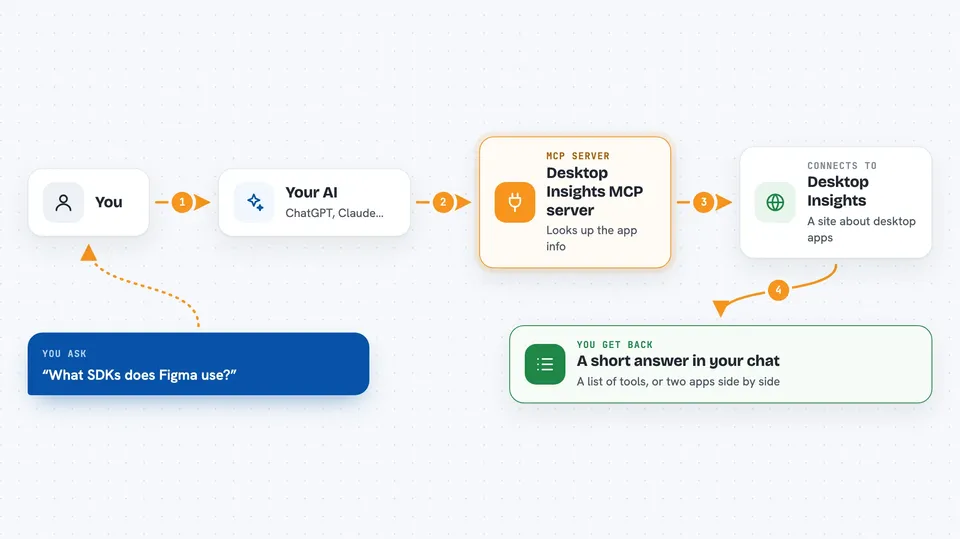
You ask your AI a question about desktop apps, like what tools a certain app uses. Your AI passes that question to this helper. The helper talks to Desktop Insights over the internet and gets the matching information back. Then your AI turns that into a normal answer in your chat, in plain words. You do not have to visit the Desktop Insights website yourself or copy anything by hand.
 Click to zoom
What you can do with it
- Look up the SDKs and dependencies a specific app uses
- Search for apps that use a particular tool, runtime, platform or developer
- Compare the technology stacks of two apps side by side
- See which error tracking, payments or analytics tools an app relies on
- Find all apps from one company on macOS or Windows
- Browse the list of SDK categories to see what filters are available
Try asking your AI
- “What SDKs does Figma use?”
- “Which apps use Sentry for error tracking?”
- “Compare Figma vs Sketch”
- “Find all Electron apps that use Stripe”
What it gives back to you
You get answers in your chat, usually as short lists or short summaries. For example, a lookup gives you the SDKs and dependencies found for that app, and a comparison gives you the two stacks next to each other. Searches come back as a list of matching apps. It is read-only, so nothing on the Desktop Insights site changes.
Before you start
What you need
- A Desktop Insights API key (a kind of password for apps; you get one free at desktopinsights.com/settings/api)
- Node.js installed on your computer (the helper runs through npx)
- An AI app that supports MCP, like Claude Desktop, Claude Code or Cursor
Good to know
It only reads public information about apps, so it cannot change or delete anything, but you do need to keep your API key private.
Install it with your AI
Add Desktop Insights MCP server to your AI, no technical skills needed
You don't install anything by hand. You copy one prompt, paste it into an AI that can work on your computer, and it checks, installs and connects the server for you, asking you when it needs something.
Sign in to get the install prompt
Members get a ready-made prompt that lets the Claude desktop app check Desktop Insights MCP server, install it and connect it for them, step by step. You don't need any technical skills: you copy, paste and answer a few questions. Your connected AI can also find and install any of the 4,609 MCP servers here for you.
Who it's for
Developers, product people and anyone curious about how popular desktop apps are built or which tools are common in their field.