MCP server · Developer tools
CodeWiki MCP server
by izzzzzi
Lets your AI search open-source projects and read AI-written wiki docs about how they work.
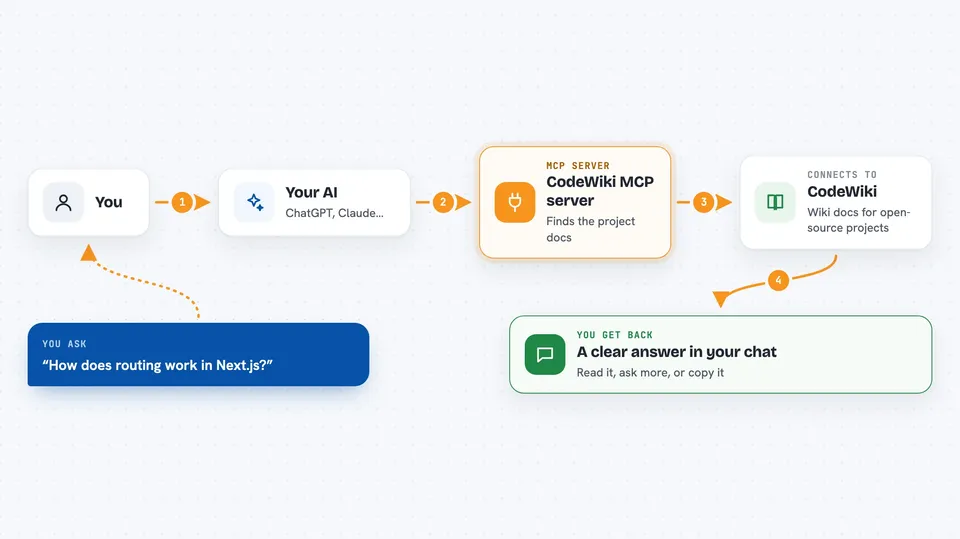
This is a small helper that connects your AI assistant to codewiki.google, a site that writes plain-English wiki documentation for open-source projects on GitHub. Once it is connected, you can ask your AI about how a project works and it will go fetch the docs for you. It is handy if you read code, follow a library, or just want to understand what a project does without digging through files yourself.
What is an MCP server? The 30-second version
On its own, your AI can only chat with you using what it already knows. An MCP server is a small helper program that gives your AI a new skill or a connection to an outside service. This one connects your AI to codewiki.google, a site that keeps AI-written wiki pages for open-source projects. So when you ask about a project, your AI can look it up there and bring the answer back to you.
What this MCP server does
You ask your AI something like how a certain library handles routing, or what a project is about. Your AI passes that request to this helper. The helper talks to codewiki.google, which has wiki-style docs for many GitHub projects, and asks for the matching page or answer. The result comes back into your chat as text you can read, ask follow-up questions about, or copy into your notes.
 Click to zoom
What you can do with it
- Search for open-source projects by keyword
- Fetch the full wiki documentation for a project
- Get the docs broken into separate pages with headings
- Ask a plain-English question about how a project works
- Ask follow-up questions and keep the conversation going
- Use a project name, a GitHub link, or just describe it in words
Try asking your AI
- “codewiki fetch how routing works in Next.js”
- “codewiki search state management libraries”
- “codewiki ask how does React fiber reconciler work?”
- “codewiki ask fastify how to add authentication?”
What it gives back to you
You get text back in the chat: a list of matching projects, a full documentation page in markdown, or a written answer to your question. Each reply also includes small details like how many bytes it was and how long it took. For page mode you get the docs split into titled sections you can read one by one.
Before you start
What you need
- An MCP-compatible AI app like Claude Desktop, Cursor, Windsurf, or VS Code with Copilot
- Node.js installed on your computer (the helper runs through npx)
- Optional: a GitHub token if you want the natural-language project lookup to work without hitting rate limits
Good to know
It only reads public documentation from codewiki.google, so it cannot change anything on your computer or in your accounts.
Install it with your AI
Add CodeWiki MCP server to your AI, no technical skills needed
You don't install anything by hand. You copy one prompt, paste it into an AI that can work on your computer, and it checks, installs and connects the server for you, asking you when it needs something.
Sign in to get the install prompt
Members get a ready-made prompt that lets the Claude desktop app check CodeWiki MCP server, install it and connect it for them, step by step. You don't need any technical skills: you copy, paste and answer a few questions. Your connected AI can also find and install any of the 4,609 MCP servers here for you.
Who it's for
Developers, technical writers, and anyone who reads or follows open-source projects and wants quick plain-English explanations of how they work.