MCP server · Developer tools
DemandScope MCP server
by baobabcat
Check if people actually want a product idea by looking at GitHub, Hacker News and download numbers.
DemandScope is a small helper that checks how much interest there is around a product or tool idea. It looks at public signals like GitHub projects, Hacker News posts and download counts on npm and PyPI. It is handy if you are thinking about building something and want a quick reality check before you spend weeks on it.
What is an MCP server? The 30-second version
On its own, your AI can only chat with you. An MCP server is a small helper program that gives your AI a new skill or a connection to a service. This one connects your AI to DemandScope, which reads public data from GitHub, Hacker News, npm and PyPI. Once it is set up, you can just ask your AI a question and it will go fetch the numbers for you.
What this MCP server does
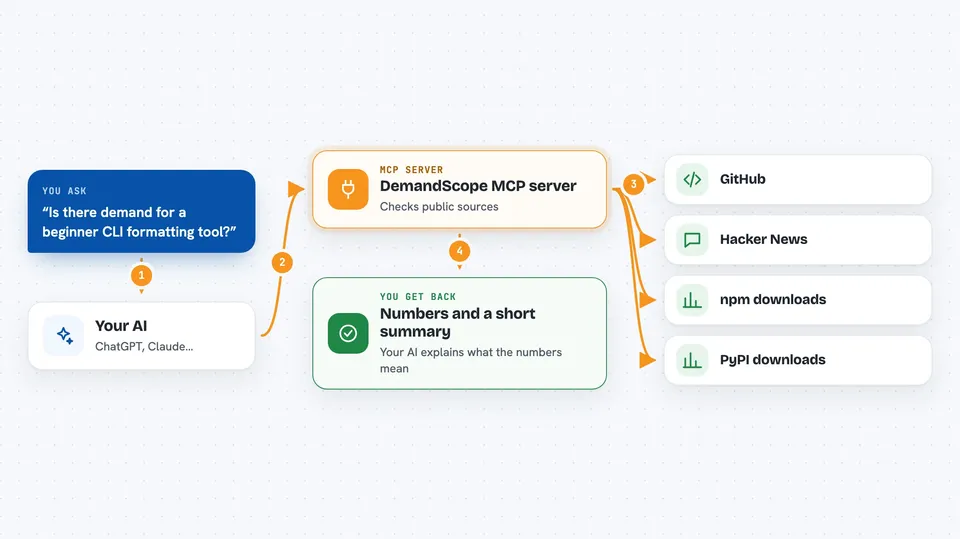
You ask your AI something like how popular a certain kind of tool is right now. The AI passes your question to the DemandScope helper running on your computer. The helper then calls free public services: GitHub search, Hacker News search, npm download stats and PyPI download stats. It collects the numbers and sends them back to your AI, which explains them to you in the chat. Some tools also compare two time windows to show if interest is speeding up or slowing down.
 Click to zoom
What you can do with it
- Count GitHub repositories that match a keyword to see how crowded a space is
- Check whether GitHub activity around a topic is growing or shrinking
- See how much attention a topic gets on Hacker News
- Compare Hacker News mentions between two time windows
- Look up download counts for npm packages similar to your idea
- Look up download counts for PyPI packages similar to your idea
- Reuse cached results so repeat questions come back instantly
Try asking your AI
- “How many GitHub repos mention AI note-taking tools, and is that number growing?”
- “Is there more Hacker News chatter about local-first apps this month than last month?”
- “What are the npm download numbers for the top three markdown editor packages?”
- “Give me a quick demand check for a CLI tool that formats for beginners.”
What it gives back to you
You get numbers and short summaries in the chat. For example, a count of matching GitHub repos, a growth ratio that tells you if interest is rising, or download totals for a package. The AI turns those raw numbers into a few sentences you can read. Nothing is changed anywhere; it only reads public data.
Before you start
What you need
- Python 3 on your computer
- The DemandScope files from the GitHub page
- An MCP-compatible AI app that can run local servers, like Claude Desktop
Good to know
Download counts include automated traffic from build servers and mirrors, so treat the numbers as a rough direction, not an exact market size.
Install it with your AI
Add DemandScope MCP server to your AI, no technical skills needed
You don't install anything by hand. You copy one prompt, paste it into an AI that can work on your computer, and it checks, installs and connects the server for you, asking you when it needs something.
Sign in to get the install prompt
Members get a ready-made prompt that lets the Claude desktop app check DemandScope MCP server, install it and connect it for them, step by step. You don't need any technical skills: you copy, paste and answer a few questions. Your connected AI can also find and install any of the 4,361 MCP servers here for you.
Who it's for
Indie builders, product managers and developers who want a quick, free way to check if an idea has real demand before building it.