
MCP server · Developer tools
ReSharper CLI MCP server
by andypgray
Run ReSharper inspections and code cleanup on your C# solution through your AI, without opening an IDE.
This is a helper that lets your AI check and tidy up C# code using JetBrains' ReSharper tools, without you opening an IDE. It is handy if you work on a C# project and want a quick list of problems or a formatting pass done for you. It is unofficial and not connected to JetBrains.
What is an MCP server? The 30-second version
On its own, your AI can only chat. An MCP server is a small helper program that gives your AI a new skill or a connection to another tool. This one connects your AI to ReSharper's command-line tools, so it can inspect your C# solution and clean up code files when you ask. You install it once, and then your AI can use it in the background.
What this MCP server does
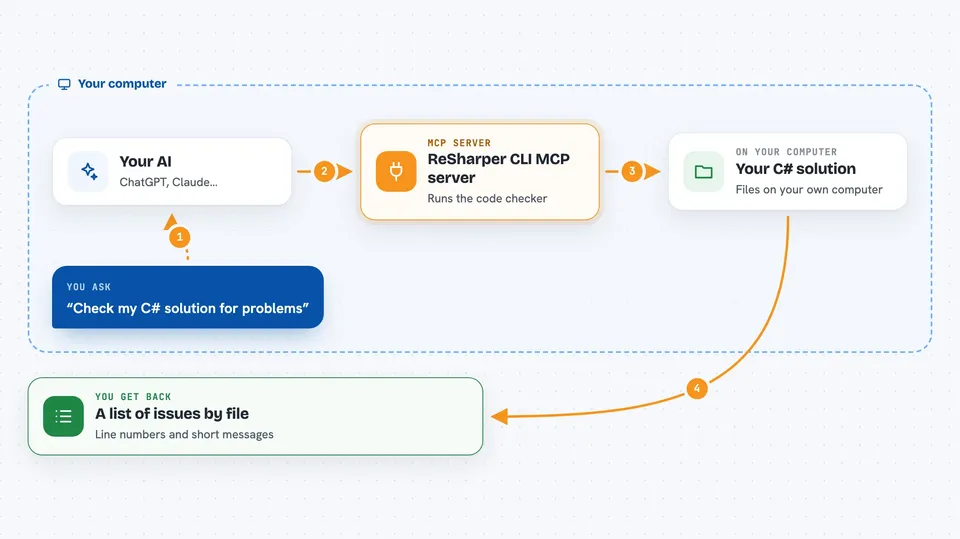
You ask your AI something like "check my solution for problems." The AI passes that request to this helper. The helper runs ReSharper's command-line tool against your solution, waits for it to finish, and turns the results into a tidy list. You get that list back in the chat, grouped by file, with line numbers and short messages. If you ask for cleanup instead, the helper runs ReSharper's cleanup on the files you name and tells you which files it changed.
 Click to zoom
What you can do with it
- Inspect a whole C# solution and get a list of issues grouped by file
- Filter issues by severity, from suggestions up to errors
- Limit an inspection to certain files using a pattern
- Run ReSharper's code cleanup on the files you changed
- Reset the ReSharper cache so the next run starts fresh
- Get a full issue report written to a file when the summary is not enough
Try asking your AI
- “Inspect my solution and show me the warnings and errors.”
- “Check only the files under src/Controllers and tell me what needs fixing.”
- “Run cleanup on the files I just changed and tell me what you touched.”
- “Give me a full markdown report of every issue in this solution.”
What it gives back to you
You get a list of issues grouped by file, each with a line number, a severity, a rule name, and a short message. If there are many issues, the list is shortened to fit the chat window, but every issue is still counted and every file is still named. For cleanup, you get a short note saying which files were changed on disk. If you asked for a full report, you get a file path you can open.
Before you start
What you need
- The .NET 10 SDK installed on your computer
- JetBrains' ReSharper Command Line Tools installed (a free .NET tool called jb)
- A C# solution file (.sln or .slnx) for it to work on
- An MCP client such as Claude Code, Cursor, or Visual Studio
Good to know
The cleanup tool changes your files on disk, so make sure your work is saved or committed before you run it.
Install it with your AI
Add ReSharper CLI MCP server to your AI, no technical skills needed
You don't install anything by hand. You copy one prompt, paste it into an AI that can work on your computer, and it checks, installs and connects the server for you, asking you when it needs something.
Sign in to get the install prompt
Members get a ready-made prompt that lets the Claude desktop app check ReSharper CLI MCP server, install it and connect it for them, step by step. You don't need any technical skills: you copy, paste and answer a few questions. Your connected AI can also find and install any of the 4,609 MCP servers here for you.
Who it's for
C# developers and anyone who works on a .NET codebase and wants quick inspections or formatting help without opening an IDE.




