
MCP server · Finance and crypto
Jupiter MCP server
by araa47
Lets your AI look up Solana tokens, check wallet balances, get swap quotes, and set up limit orders for you.
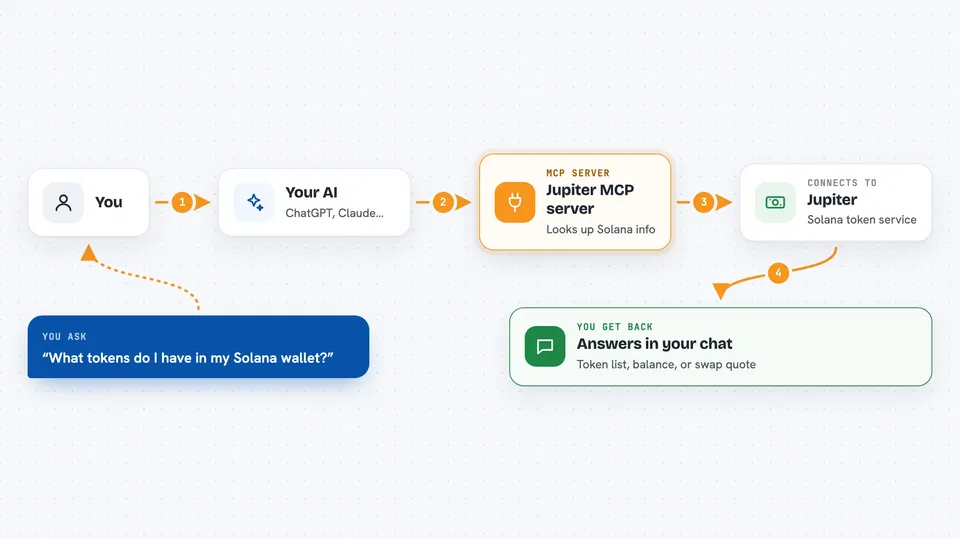
This is a helper that connects your AI assistant to Jupiter, a service that swaps tokens on the Solana network. It is handy if you already trade Solana tokens and want to ask your AI to check prices, look up tokens, or prepare trades instead of clicking around a website. You still approve and sign every real trade yourself.
What is an MCP server? The 30-second version
On its own, your AI can only chat. An MCP server is a small helper program that gives your AI a new skill or a connection to an app or service. This one connects your AI to Jupiter, the Solana token swap service, so it can look up tokens, check balances, and prepare trades for you when you ask. Think of it as giving your assistant a phone line to Jupiter.
What this MCP server does
You ask your AI something like "what is my SOL balance" or "find me a token called BONK". Your AI passes that request to this helper. The helper talks to Jupiter's API over the internet and gets the answer. Then your AI shows you the result in the chat, like a list of tokens, a balance, or a swap quote with the numbers. For actual trades, the helper prepares the transaction and you sign it with your own wallet key.
 Click to zoom
What you can do with it
- Check the token balances in your Solana wallet
- Search for a token by name or symbol
- Get a swap quote showing how much you would get for a trade
- Look up security information about a token before you buy
- Create a limit order that runs when your target price is hit
- List your active and past limit orders
- Cancel one or several limit orders
Try asking your AI
- “What tokens do I have in my Solana wallet?”
- “Get me a quote to swap 1 SOL for USDC.”
- “Search for the token called JUP.”
- “Show me my open limit orders.”
What it gives back to you
You get answers in the chat: a list of tokens with amounts, a swap quote with the expected output and fees, a token search result, or a list of your limit orders. When you create or cancel an order, it tells you what was prepared or changed. Real trades only happen after you sign them with your own key.
Before you start
What you need
- A Solana wallet with some SOL in it
- Your Solana private key in base58 format (exported from a wallet like Phantom)
- Node.js and npx installed on your computer
- uv (the Python package manager) installed on your computer
Good to know
Two of the tools, execute_swap_transaction and execute_limit_order, spend real SOL from your wallet, and all orders include a 2.55% referral fee, so only use this with money you are ready to trade.
Install it with your AI
Add Jupiter MCP server to your AI, no technical skills needed
You don't install anything by hand. You copy one prompt, paste it into an AI that can work on your computer, and it checks, installs and connects the server for you, asking you when it needs something.
Sign in to get the install prompt
Members get a ready-made prompt that lets the Claude desktop app check Jupiter MCP server, install it and connect it for them, step by step. You don't need any technical skills: you copy, paste and answer a few questions. Your connected AI can also find and install any of the 4,609 MCP servers here for you.
Who it's for
Solana token traders and crypto-curious people who already use an AI assistant and want a quicker way to check balances, look up tokens, and prepare trades.



