
MCP server · Finance and crypto
Zerodha Kite MCP server
by aranjan
Let your AI check your Zerodha portfolio, get live quotes, and place buy or sell orders for Indian stocks.
This is a small helper that connects your AI assistant to your Zerodha Kite trading account. Once it is set up, you can talk to your AI in plain English about your Indian stocks and it can actually look things up and place orders for you. It is handy if you already trade on Zerodha and want to skip the clicking and typing.
What is an MCP server? The 30-second version
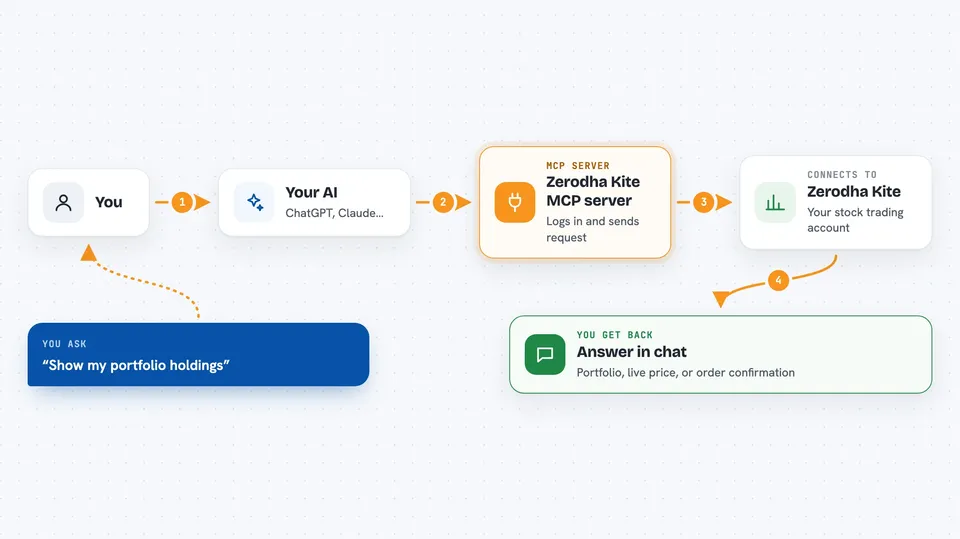
On its own, your AI can only chat. It cannot see your Zerodha account or do anything there. An MCP server is a small helper program that gives your AI a new skill, and this one gives it a connection to Zerodha Kite. So when you ask about your holdings or want to buy a stock, the AI passes your request to this helper, which talks to Zerodha and brings the answer back to your chat.
What this MCP server does
You type a normal sentence, like asking for your portfolio or telling it to buy some shares. Your AI figures out what you mean, including matching a company name like Infosys to its trading symbol. It then uses this helper, which logs in to your Zerodha account and sends the request to Zerodha Kite. Zerodha sends back the data or confirms the trade, and the helper passes it to your AI, which shows it to you in the chat. It also handles the daily login for you if you set up the TOTP secret.
 Click to zoom
What you can do with it
- Check your portfolio holdings and see profit or loss
- Get live market quotes for a stock
- Place buy or sell orders at market, limit, or stop-loss price
- Modify or cancel pending orders
- See how much cash you have available
- Set a stop-loss or target trigger with GTT orders
- Look up historical price data for a stock
Try asking your AI
- “Show my portfolio holdings”
- “What's Tata Motors trading at right now?”
- “Buy 10 Infosys at market price”
- “Set a stop-loss on my HAL position at 3400”
- “Cancel my last pending order”
What it gives back to you
You get answers right in the chat, in plain words. For a portfolio question, your AI shows a list of holdings with profit and loss, and often a short summary of your top gainers and losers. For a quote, you get the current price. For an order, you get a confirmation that it was placed, changed, or cancelled.
Before you start
What you need
- A Zerodha trading account
- A Kite Connect API app from developers.kite.trade (this gives you an API key and secret)
- Your Zerodha user ID and password
- Python installed on your computer, plus the kite-mcp package
- An MCP-compatible AI app like Claude Desktop or Cursor
Good to know
This can place real buy and sell orders with your money, so always double-check the stock, quantity, and price before you confirm.
Install it with your AI
Add Zerodha Kite MCP server to your AI, no technical skills needed
You don't install anything by hand. You copy one prompt, paste it into an AI that can work on your computer, and it checks, installs and connects the server for you, asking you when it needs something.
Sign in to get the install prompt
Members get a ready-made prompt that lets the Claude desktop app check Zerodha Kite MCP server, install it and connect it for them, step by step. You don't need any technical skills: you copy, paste and answer a few questions. Your connected AI can also find and install any of the 4,609 MCP servers here for you.
Who it's for
Zerodha users who trade Indian stocks and want to check their portfolio or place orders by chatting with an AI instead of clicking around.



