
MCP server · Finance and crypto
MetaTrader 5 MCP server
by ariadng
Ask your AI to check your MetaTrader 5 account, read prices, and place or close trades for you.
This is a small helper that connects your AI assistant to MetaTrader 5, the trading platform many people use for forex, gold, oil and crypto. Once it is set up, you can type things like "what is my balance" or "buy 0.01 lots of EUR/USD" and the AI carries it out in your own MetaTrader terminal. It is handy for traders who already use MetaTrader 5 and want to skip some clicking.
What is an MCP server? The 30-second version
On its own, your AI can only chat. An MCP server is a small helper program that gives your AI a new skill or a connection to another app. This one connects your AI to your MetaTrader 5 platform, so the AI can look up your account, read live prices and place orders when you ask. You run it on your own computer, and your login details stay there.
What this MCP server does
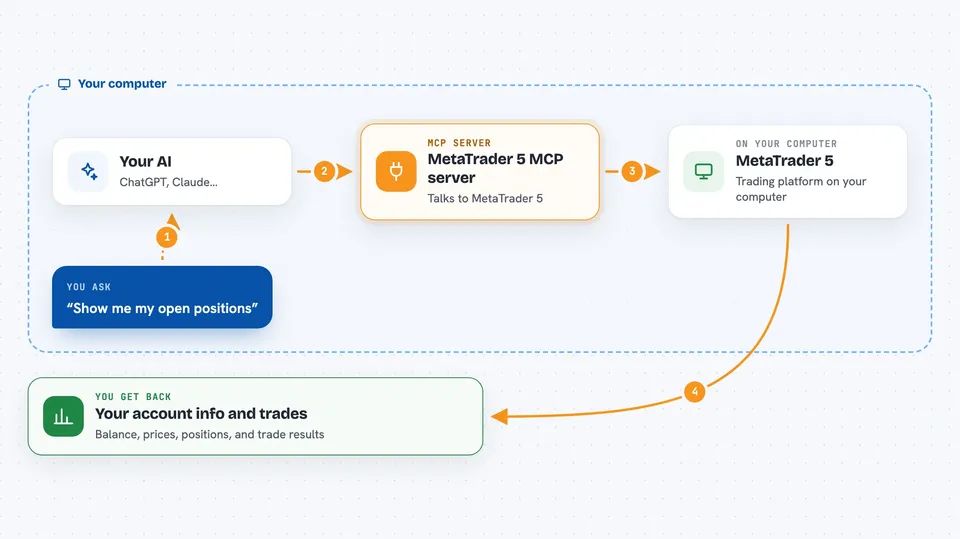
You type a request in plain English, like "show me my open positions". Your AI passes that request to this helper program. The helper then talks to MetaTrader 5 on your machine, which is where your account and the market data live. MetaTrader 5 sends the answer back, and the AI shows it to you in the chat as a table or a short summary. If you ask for a trade, the helper sends that order to MetaTrader 5 too.
 Click to zoom
What you can do with it
- Check your account balance, equity, margin and leverage
- Look up the current bid, ask and spread for a symbol like EUR/USD
- Place a market buy or sell order with a stop loss and take profit
- Modify or close an open position
- Close all your losing or all your winning positions in one go
- Review your past trades for a symbol or a date range
- Stream live prices for a list of symbols over a WebSocket connection
Try asking your AI
- “Show me my account information”
- “What is the current price of EUR/USD?”
- “Buy 0.01 lots of GBP/USD with stop loss at 1.2500 and take profit at 1.2700”
- “Close all my losing positions”
What it gives back to you
You get answers in the chat: numbers like your balance and equity, price details such as bid, ask and spread, and tables of open positions or past trades. When you place or close a trade, it tells you whether it worked and what the result was. For the WebSocket option, you get a steady stream of live price updates instead of a single answer.
Before you start
What you need
- Python 3.10 or higher installed on your computer
- The MetaTrader 5 terminal installed and running
- Your MetaTrader 5 account login number, password and server name (a demo account works too)
- Algorithmic trading switched on in MetaTrader 5 under Tools, Options, Expert Advisors
Good to know
This can place and close real trades on your account, so a wrong or unclear request can lose money; start with a demo account and double check every order before you send it.
Install it with your AI
Add MetaTrader 5 MCP server to your AI, no technical skills needed
You don't install anything by hand. You copy one prompt, paste it into an AI that can work on your computer, and it checks, installs and connects the server for you, asking you when it needs something.
Sign in to get the install prompt
Members get a ready-made prompt that lets the Claude desktop app check MetaTrader 5 MCP server, install it and connect it for them, step by step. You don't need any technical skills: you copy, paste and answer a few questions. Your connected AI can also find and install any of the 4,361 MCP servers here for you.
Who it's for
Traders who already use MetaTrader 5 and want to place and manage trades by chatting with an AI instead of clicking through the platform.




