
MCP server · Finance and crypto
Armor Crypto MCP server
by armorwallet
Lets your AI manage a crypto wallet, swap coins, stake, and set up automatic trades on Solana.
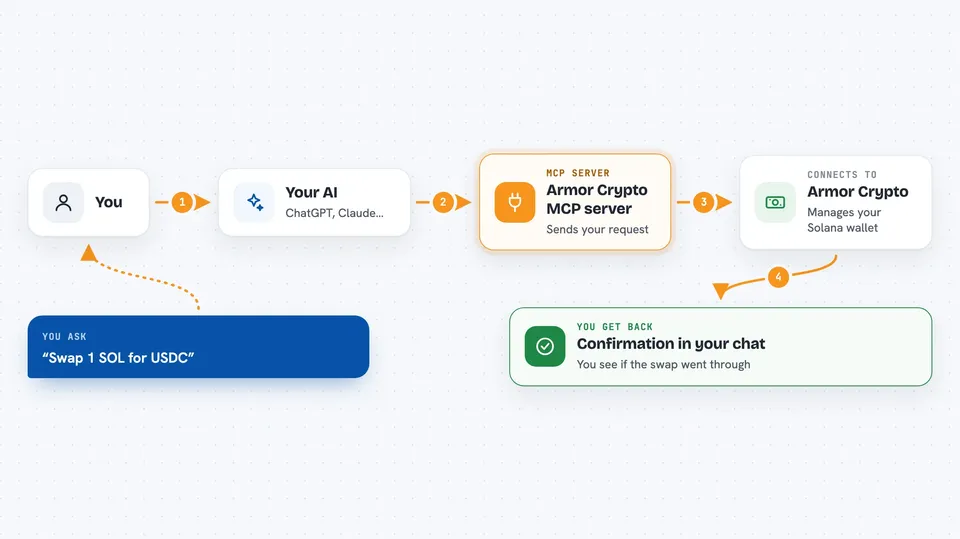
Armor Crypto MCP is a helper that connects your AI assistant to the world of cryptocurrency. Once it is set up, you can ask your AI in normal words to check your wallet, swap one coin for another, stake coins, or set up a repeating buy. It is handy for people who already hold some crypto and want to do everyday tasks without clicking through several apps.
What is an MCP server? The 30-second version
On its own, your AI can only chat. It cannot touch your crypto or look up live coin prices. An MCP server is a small helper program that gives your AI a new skill, and here that skill is talking to the Armor service, which handles crypto wallets and trades. So when you ask your AI to do something with your coins, the AI passes the request to this helper, and the helper does the work for you.
What this MCP server does
You type a request in plain words, like asking your AI to swap some Solana for another coin. Your AI sends that request to the Armor helper. The helper talks to the Armor service, which actually performs the action on the Solana blockchain. Then the result comes back to your chat, so you see what happened, like a confirmation or a list of your open orders.
 Click to zoom
What you can do with it
- Create and organize crypto wallets
- Swap one coin for another
- Set up repeating buys (DCA) and limit orders
- Stake and unstake coins
- Look up coins and see what is trending
- Run simple calculations on coin data
- List or cancel your scheduled trades
Try asking your AI
- “Show me my wallet balance”
- “Swap 1 SOL for USDC”
- “Set up a daily buy of 10 dollars of SOL”
- “What coins are trending right now”
What it gives back to you
You get answers in the chat, like a list of your wallets, a summary of your open orders, or a confirmation that a swap went through. For coin lookups you see names, prices, and trending info. For trades you see whether the order was placed, listed, or cancelled.
Before you start
What you need
- Python installed on your computer
- The uv tool installed (the README shows how)
- An Armor API key, which you get by holding an Armor NFT
- Claude Desktop or another AI app that supports MCP servers
Good to know
This tool can move real money and crypto, so double check every request before you confirm, and remember it is still an alpha test version.
Install it with your AI
Add Armor Crypto MCP server to your AI, no technical skills needed
You don't install anything by hand. You copy one prompt, paste it into an AI that can work on your computer, and it checks, installs and connects the server for you, asking you when it needs something.
Sign in to get the install prompt
Members get a ready-made prompt that lets the Claude desktop app check Armor Crypto MCP server, install it and connect it for them, step by step. You don't need any technical skills: you copy, paste and answer a few questions. Your connected AI can also find and install any of the 4,609 MCP servers here for you.
Who it's for
People who already hold crypto and want to manage it through their AI assistant without jumping between apps.



