MCP server · Research
Claudinho World Cup server
Ask your AI for live World Cup scores, fixtures, standings and the knockout bracket.
Claudinho is a small helper that lets your AI answer questions about the 2026 men's football tournament. It knows the full schedule of all 104 matches, and it can look up live scores, group tables and the knockout tree while the games are on. It is handy if you follow the tournament and want quick answers without opening a sports site.
What is an MCP server? The 30-second version
On its own, your AI can only chat with you. An MCP server is a small helper program that gives your AI a new skill or a connection to an app or service. This one connects your AI to World Cup match data, so when you ask about a score or a table, the AI can go and look it up for you. You do not need to install anything complicated or sign up for an account.
What this MCP server does
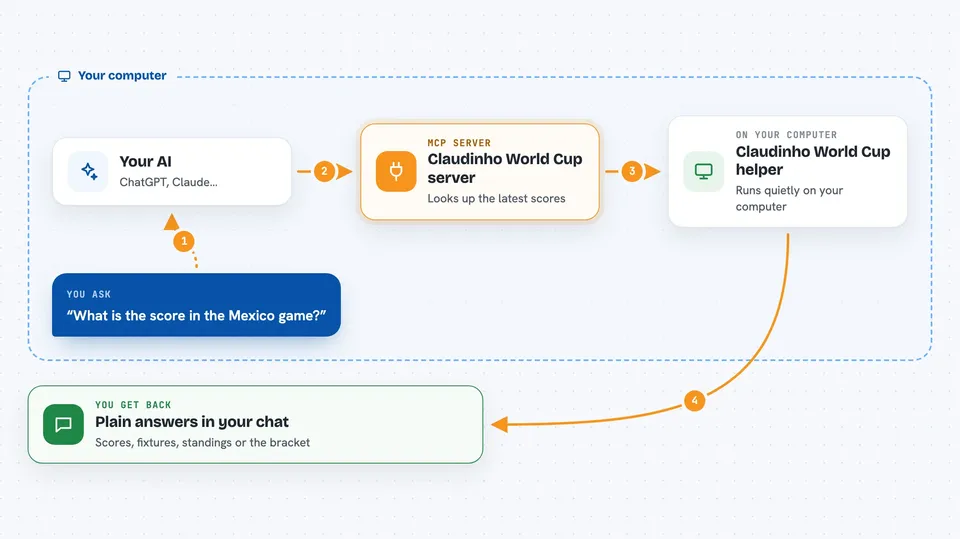
You ask your AI something like what is the score in the Mexico game. The AI passes your question to Claudinho, this small helper running quietly on your computer. Claudinho then checks public sports data for the latest scores, fixtures or standings. It sends the answer back to your AI, and your AI tells you in plain words in the chat. Everything is read-only, so it only looks things up and never changes anything.
 Click to zoom
What you can do with it
- Check live scores during match windows
- See today's fixtures and kickoff times
- Look up a group's standings table
- Find a team's next match
- View the knockout bracket
- Look up a team's short code from its name
- Get a read-only market signal line about who is favored
Try asking your AI
- “What is the score in the France game right now?”
- “Show me the standings for Group A”
- “When does Mexico play next?”
- “What does the knockout bracket look like so far?”
What it gives back to you
You get short, plain answers in the chat: scores with the minute, lists of fixtures, a standings table, or the bracket. It can also give you a ready-made text card you can copy into a group chat. Everything comes back as text, so there is nothing to download or open.
Before you start
What you need
- Node.js installed on your computer (the free program that runs small tools like this)
- An AI app that supports MCP servers, such as Claude Code, Cursor, Codex, Claude Desktop, Windsurf, Zed or VS Code
Good to know
The market signal is informational only and is not betting advice, and live scores come from public sports data so they can lag a few seconds behind TV.
Install it with your AI
Add Claudinho World Cup server to your AI, no technical skills needed
You don't install anything by hand. You copy one prompt, paste it into an AI that can work on your computer, and it checks, installs and connects the server for you, asking you when it needs something.
Sign in to get the install prompt
Members get a ready-made prompt that lets the Claude desktop app check Claudinho World Cup server, install it and connect it for them, step by step. You don't need any technical skills: you copy, paste and answer a few questions. Your connected AI can also find and install any of the 4,609 MCP servers here for you.
Who it's for
Anyone following the 2026 World Cup who already uses an AI assistant and wants quick scores and tables without leaving the chat.