MCP server · API
MCP Link
Turn any web API that has an OpenAPI description into something your AI can use.

MCP Link is a small helper program that takes a web service's instruction manual (called an OpenAPI file) and turns it into something your AI assistant can actually use. If you have ever wished your AI could talk to a specific app or website that it does not know about yet, this is the tool for that. It is handy for people who work with a company's own internal tools or lesser-known services.
What is an MCP server? The 30-second version
On its own, your AI can only chat with you. An MCP server is a small helper program that gives your AI a new skill or a connection to an app or service. MCP Link is that helper: you point it at a web service's instruction manual, and it teaches your AI how to talk to that service. Then when you ask your AI to look something up or do something there, it knows how.
What this MCP server does
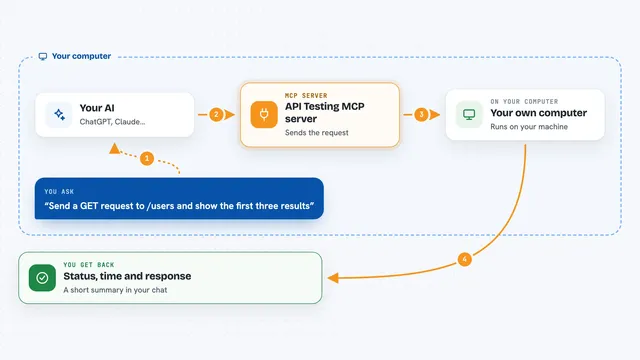
You give MCP Link the web address of an OpenAPI file, which is a document that describes what a web service can do. MCP Link reads that document and builds a bridge between your AI and that service. When you ask your AI something, the AI sends the request through MCP Link, MCP Link talks to the real service, and the answer comes back to your chat. You do not need to change the original service at all. It just works as a middleman.
 Click to zoom
What you can do with it
- Connect your AI to a web service that has an OpenAPI description
- Try out a hosted version online without installing anything
- Use ready-made links for popular services like GitHub, Slack, Notion, Stripe, and more
- Filter which parts of an API your AI is allowed to see or use
- Add authentication headers so the AI can log in to a service on your behalf
- Run it on your own computer so your data stays local
Try asking your AI
- “Use the GitHub link to list my open pull requests”
- “Search the web for recent news about electric cars using the Brave Search link”
- “Show me my Notion pages that were updated this week”
- “List my Slack channels using the Slack link”
What it gives back to you
You get answers in your chat, just like talking to a person. If you asked for a list, you see a list. If you asked a question, you get a sentence or two back. If you asked the AI to change something, it tells you what it changed.
Before you start
What you need
- A web service that has an OpenAPI description file
- The web address of that OpenAPI file
- The base web address of the service itself
- If the service needs a login, the name of the login header and a value prefix
Good to know
If the service you connect can change or delete things, your AI might do that too, so be careful with what you ask it to do.
Install it with your AI
Add MCP Link to your AI, no technical skills needed
You don't install anything by hand. You copy one prompt, paste it into an AI that can work on your computer, and it checks, installs and connects the server for you, asking you when it needs something.
Sign in to get the install prompt
Members get a ready-made prompt that lets the Claude desktop app check MCP Link, install it and connect it for them, step by step. You don't need any technical skills: you copy, paste and answer a few questions. Your connected AI can also find and install any of the 4,361 MCP servers here for you.
Who it's for
People who work with company internal tools or niche web services and want their AI to be able to use them.