MCP server · Developer tools
Bruno MCP server
by hungthai1401
Lets your AI run your Bruno API test collections and report which tests passed or failed.

This is a small helper that connects your AI assistant to Bruno, a free app for testing APIs. Once it is set up, you can ask your AI to run one of your Bruno collections and it will tell you what passed, what failed, and how long it took. It is handy for anyone who already keeps their API tests in Bruno and wants quick answers without clicking around.
What is an MCP server? The 30-second version
On its own, your AI can only chat. It cannot open Bruno or run your tests. An MCP server is a small helper program that gives your AI a new skill, and in this case the skill is running Bruno collections. You ask in plain words, the AI passes the request to this helper, and the helper runs Bruno for you.
What this MCP server does
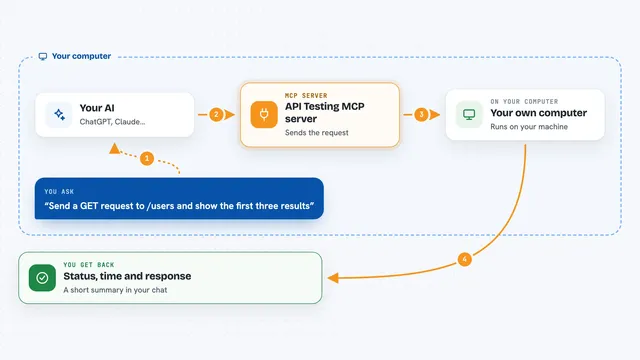
You tell your AI which Bruno collection to run, and where it lives on your computer. The AI hands that path to this helper. The helper runs the collection through the Bruno command line tool. When it finishes, it collects the results: how many tests ran, how many passed, how many failed, and how long it took. Then your AI turns that into a short, readable answer for you.
 Click to zoom
What you can do with it
- Run a Bruno collection and see if all tests passed
- Run a collection with a specific environment file
- Pass environment variables to a run
- See a list of which tests failed
- Check how long a collection took to run
- Ask for a plain-English summary of the results
Try asking your AI
- “Run the Bruno collection at /path/to/collection.bru and tell me if all tests passed”
- “Run my Bruno collection with the staging environment and summarize the failures”
- “Run the collection at ./api-tests and set the variable baseUrl to https://staging.example.com”
- “Which tests failed in my last Bruno run, and how long did the whole thing take?”
What it gives back to you
You get a short summary in the chat: whether the run succeeded, how many tests ran, how many passed, and how many failed. If something failed, it lists the failures. It also shows when the run started, when it finished, and how long it took. Your AI usually rewrites all of that into a friendly sentence or two.
Before you start
What you need
- Node.js installed on your computer (the helper runs through npx)
- A Bruno collection saved somewhere on your computer
- The Claude desktop app, or another AI app that supports MCP servers
Good to know
It runs your Bruno collections for real, so any requests in them (including ones that change or delete data) will actually happen.
Install it with your AI
Add Bruno MCP server to your AI, no technical skills needed
You don't install anything by hand. You copy one prompt, paste it into an AI that can work on your computer, and it checks, installs and connects the server for you, asking you when it needs something.
Sign in to get the install prompt
Members get a ready-made prompt that lets the Claude desktop app check Bruno MCP server, install it and connect it for them, step by step. You don't need any technical skills: you copy, paste and answer a few questions. Your connected AI can also find and install any of the 4,361 MCP servers here for you.
Who it's for
Developers and QA folks who already keep their API tests in Bruno and want to run them by just asking their AI.