MCP server · Developer tools
atest MCP server
by LinuxSuRen
Let your AI manage your atest API test suites and test cases for you, in plain chat.
This is a small helper that connects your AI assistant to atest, a tool for running API tests. If you already use atest to check that your web services behave the way they should, this lets you ask your AI to look at and manage those tests instead of clicking around. It is handy for testers and developers who spend a lot of time in test suites.
What is an MCP server? The 30-second version
On its own, your AI can only chat. An MCP server is a small helper program that gives your AI a new skill or a connection to another tool. This helper connects your AI to atest, the API testing tool, so your AI can look up and manage your test suites and test cases when you ask. You still talk to your AI the normal way. The helper quietly does the work in the background.
What this MCP server does
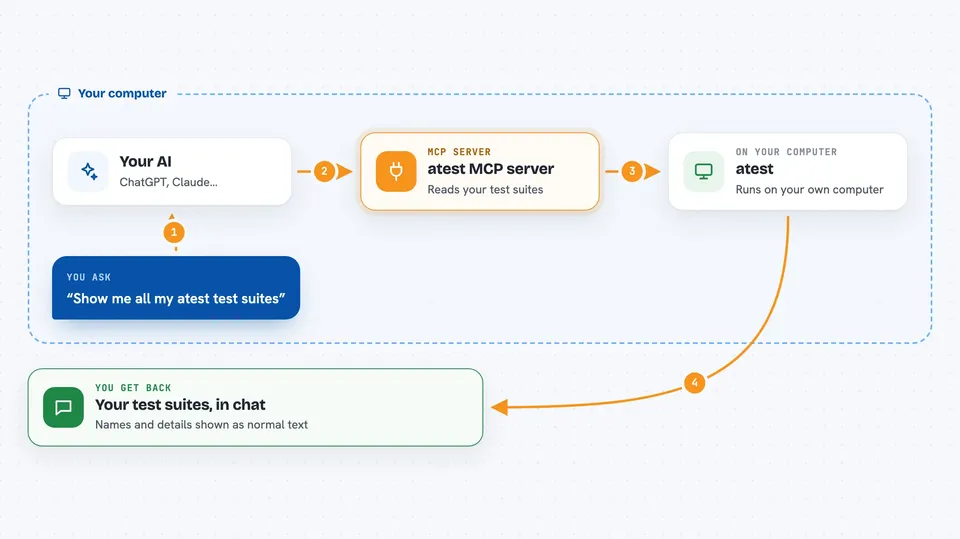
You ask your AI something about your atest tests, like listing your test suites or checking a test case. Your AI passes that request to this helper. The helper talks to atest, which is running on your machine, and gets the answer back. Then your AI shows you the result in the chat, in normal words. You never have to touch the atest interface yourself.
 Click to zoom
What you can do with it
- List your atest test suites
- Look up details of a test case
- Manage test suites and test cases through chat
- Check what tests you have set up
- Ask your AI to help organize your API tests
Try asking your AI
- “Show me all my atest test suites”
- “What test cases are in my login suite?”
- “List the test cases for the payments API”
- “Help me review the tests I have for the user service”
What it gives back to you
You get answers in the chat, usually as a list or a short summary. For example, your AI might show you the names of your test suites or the steps inside a test case. It can also tell you what it changed if you asked it to update something. Everything appears as normal text you can read.
Before you start
What you need
- atest running on your machine with its gRPC port open
- The runner address of your atest instance (for example 127.0.0.1:64385)
- Node.js if you want to run it with npx, or Docker if you prefer that route
Good to know
This helper can change your test suites and test cases, so double check before letting your AI make edits.
Install it with your AI
Add atest MCP server to your AI, no technical skills needed
You don't install anything by hand. You copy one prompt, paste it into an AI that can work on your computer, and it checks, installs and connects the server for you, asking you when it needs something.
Sign in to get the install prompt
Members get a ready-made prompt that lets the Claude desktop app check atest MCP server, install it and connect it for them, step by step. You don't need any technical skills: you copy, paste and answer a few questions. Your connected AI can also find and install any of the 4,361 MCP servers here for you.
Who it's for
Testers and developers who already use atest and want to manage their API tests by chatting with an AI.