
MCP server · Developer tools
API Testing MCP server
by cocaxcode
Lets your AI send API requests, check responses, run saved tests, and compare environments for you.
This is a helper that lets your AI actually talk to the web services your team uses, instead of just talking about them. You describe what you want to check, and the AI sends the request, looks at what comes back, and tells you if it worked. It is handy for anyone who tests or pokes at APIs but does not want to write code or learn a testing tool.
What is an MCP server? The 30-second version
On its own, your AI can only chat. It cannot reach out and touch a real service. An MCP server is a small helper program that gives your AI a new skill, in this case the skill of talking to APIs. Once this helper is connected, you can ask your AI to send a request to your service and report back, and it can do that for you right in the chat.
What this MCP server does
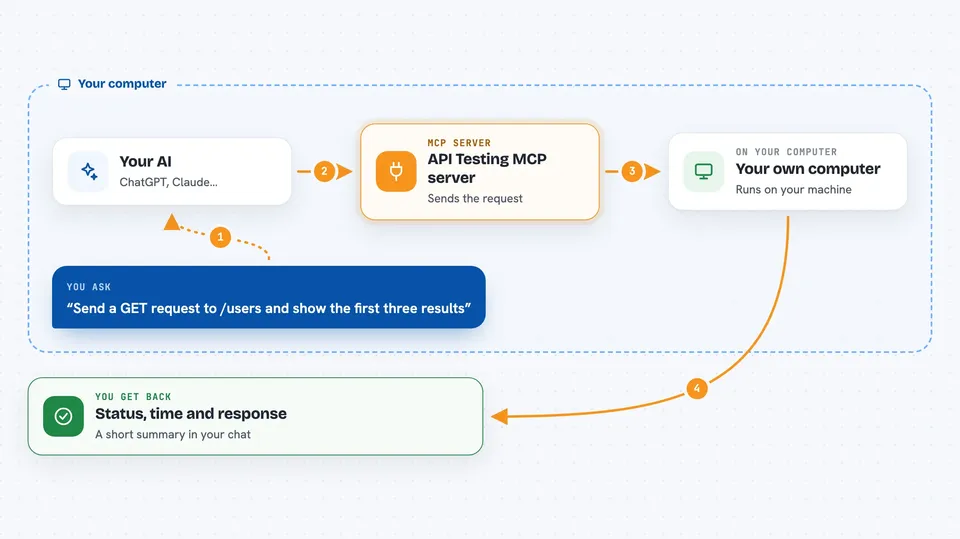
You ask your AI something like send a GET request to the users endpoint. The AI passes that to this helper program. The helper sends the real request to your service, waits for the answer, and hands the result back to the AI. The AI then shows you the status code, the timing, and the response body in plain words. If you set up an environment first, the helper fills in the base address and any tokens for you, so you can just say the short path.
 Click to zoom
What you can do with it
- Send any kind of request (GET, POST, PUT, DELETE) to your service
- Check that a response has the right status, body, and speed
- Chain steps together, like logging in and then using the token
- Import your API description and ask what each endpoint needs
- Generate fake test data that matches your API's rules
- Run all your saved tests at once and get a pass or fail summary
- Compare the same endpoint on two different environments
Try asking your AI
- “Send a GET request to /users and show me the first three results”
- “Verify that DELETE /users/5 returns 204”
- “Log in as admin, grab the token, then fetch the dashboard stats”
- “How fast is /health with 50 requests at the same time”
What it gives back to you
You get a short summary in the chat: the status code, how long it took, and the response body. For checks, you get a clear pass or fail line for each thing you asked about. For load tests, you get numbers like average time and the slowest requests. For saved test runs, you get a list showing which ones passed and which ones failed.
Before you start
What you need
- The Claude desktop app or another app that supports MCP servers
- Node.js installed on your computer (the free program that runs the helper)
- The web address of the API you want to test, and any login details it needs
Good to know
It can send real requests that change or delete data on your service, so be careful pointing it at anything live.
Install it with your AI
Add API Testing MCP server to your AI, no technical skills needed
You don't install anything by hand. You copy one prompt, paste it into an AI that can work on your computer, and it checks, installs and connects the server for you, asking you when it needs something.
Sign in to get the install prompt
Members get a ready-made prompt that lets the Claude desktop app check API Testing MCP server, install it and connect it for them, step by step. You don't need any technical skills: you copy, paste and answer a few questions. Your connected AI can also find and install any of the 4,361 MCP servers here for you.
Who it's for
Anyone who tests or explores web services at work, like QA testers, support engineers, or developers who want a quick way to check an API without leaving their chat.


