MCP server · Analytics
BetterDB Monitor MCP server
by BetterDB-inc
Lets your AI look up Valkey and Redis performance data, slow commands, and hot keys for you.
BetterDB Monitor is a tool that watches your Valkey or Redis database and remembers what happened, even things that normally get thrown away. This MCP server connects that tool to your AI assistant, so you can just ask questions in plain words instead of clicking around a dashboard. It is handy if you look after a database and want quick answers about its health.
What is an MCP server? The 30-second version
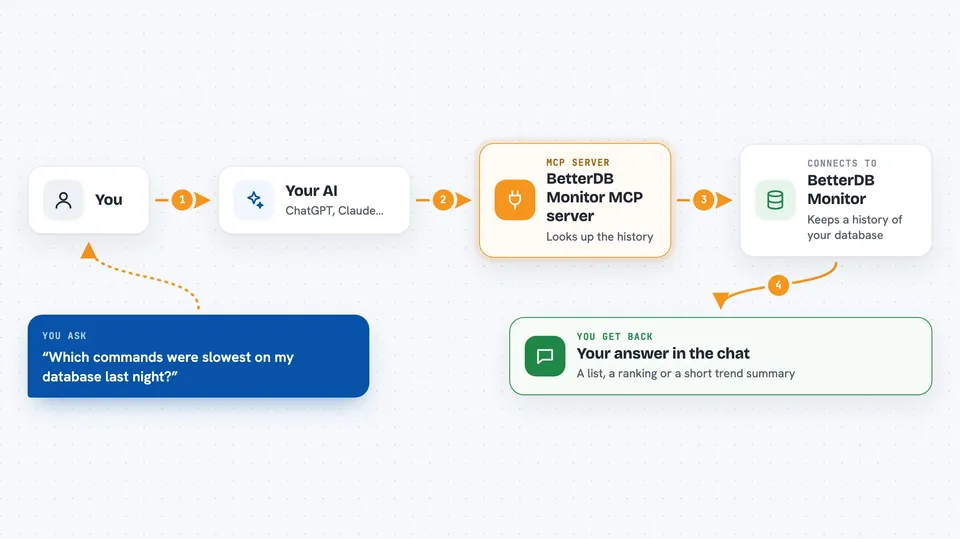
On its own, your AI can only chat. An MCP server is a small helper program that gives your AI a new skill or a connection to an app or service. This one connects your AI to BetterDB Monitor, which in turn watches your Valkey or Redis database. So when you ask a question, the AI can go and look things up there for you.
What this MCP server does
You ask your AI something like which commands were slowest last night. The AI sends that question to this helper, which talks to your BetterDB Monitor installation. The monitor looks through the history it has saved, like slowlogs, command patterns, and client activity. Then the AI gets the answer back and explains it to you in the chat.
 Click to zoom
What you can do with it
- Check slow commands over any time range
- Find the most accessed keys and how their rank changed
- See which client or service is causing the most load
- Look at memory, CPU, and ops per second trends
- Get a forecast for when memory or CPU might run out
- Review cluster topology and slot distribution
- Check vector search and inference latency for AI workloads
Try asking your AI
- “What were the slowest commands on my Valkey database in the last 24 hours?”
- “Which keys are being accessed the most right now?”
- “Show me the memory usage trend for the past week.”
- “Which client is responsible for the most commands today?”
What it gives back to you
You get answers in the chat, like a list of slow commands with their times, a ranked list of hot keys, or a summary of memory and CPU trends. Some answers come as numbers, some as short explanations. If you ask for a forecast, you get a projected time until a limit is reached.
Before you start
What you need
- A running BetterDB Monitor instance (cloud or self-hosted)
- A Valkey or Redis database for it to watch
- An MCP token from BetterDB Monitor settings (required on cloud, optional on self-hosted)
Good to know
This server can read your database monitoring data, which may include key names and client details, so treat the MCP token like a password.
Install it with your AI
Add BetterDB Monitor MCP server to your AI, no technical skills needed
You don't install anything by hand. You copy one prompt, paste it into an AI that can work on your computer, and it checks, installs and connects the server for you, asking you when it needs something.
Sign in to get the install prompt
Members get a ready-made prompt that lets the Claude desktop app check BetterDB Monitor MCP server, install it and connect it for them, step by step. You don't need any technical skills: you copy, paste and answer a few questions. Your connected AI can also find and install any of the 4,361 MCP servers here for you.
Who it's for
Anyone who looks after a Valkey or Redis database and wants quick answers without digging through dashboards.