MCP server · Developer tools · official
Dynatrace Managed MCP server
by dynatrace-oss · official
Ask your AI about problems, logs, events, SLOs and metrics in your self-hosted Dynatrace Managed setup.
This is a helper that connects your AI assistant to your own Dynatrace Managed installation, the one your company runs on its own servers. Once it is set up, you can just ask questions in plain words instead of clicking around dashboards. It is handy for anyone who watches over systems and gets asked "what broke, and why?"
What is an MCP server? The 30-second version
On its own, your AI can only chat with you. An MCP server is a small helper program that gives your AI a new skill or a connection to another system. This one connects your AI to your self-hosted Dynatrace Managed environment, so it can look up problems, logs, events, SLOs, security findings and metrics for you. You ask in normal language, and the helper goes and fetches the answer.
What this MCP server does
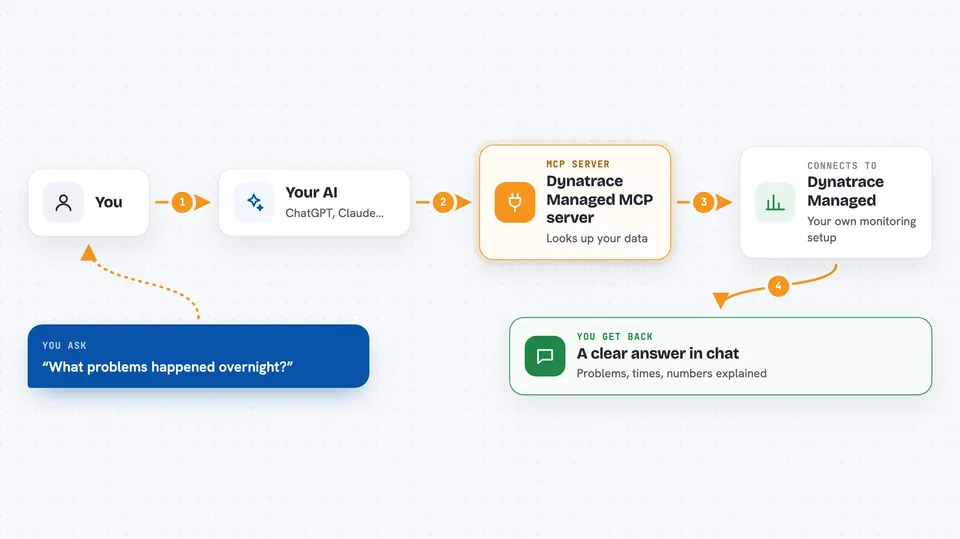
You ask your AI something like "what problems happened overnight?" The AI passes that request to this helper program running on your machine. The helper then talks to your Dynatrace Managed environment using an API token you gave it, and pulls back the matching data. The AI reads that data and explains it to you in the chat. You can also point it at more than one environment, for example production and staging, and say which one you mean.
 Click to zoom
What you can do with it
- List problems and open the details of a single one
- Look up security problems and vulnerability details
- Get information about a monitored entity and how it relates to others
- List Service Level Objectives with their evaluation and error budgets
- Search and filter logs by content and time
- Query performance metrics
- List system events
Try asking your AI
- “Show me all open problems in the production environment from the last 24 hours”
- “What do the logs say around the time this problem started?”
- “List our SLOs and tell me which ones are close to breaching their error budget”
- “Are there any open security vulnerabilities on our Kubernetes services?”
What it gives back to you
You get answers written in the chat, usually as a short list or summary with the numbers and names pulled from Dynatrace. For example, a list of problems with their severity and start time, or a set of log lines matching your search. When you ask about one specific thing, it gives you the details of that item. It only reads data, so nothing in your Dynatrace setup gets changed.
Before you start
What you need
- A self-hosted Dynatrace Managed environment you can reach
- A Dynatrace Managed API token with the read scopes listed in the README (this is like a password for apps; you create it inside Dynatrace)
- A small configuration file listing your environments (dt-config.yaml or dt-config.json)
- Node.js installed on your computer, since the server runs through npx
Good to know
The API token you create can read a lot of your monitoring data, so keep it somewhere safe and give it only the read permissions you actually need.
Install it with your AI
Add Dynatrace Managed MCP server to your AI, no technical skills needed
You don't install anything by hand. You copy one prompt, paste it into an AI that can work on your computer, and it checks, installs and connects the server for you, asking you when it needs something.
Sign in to get the install prompt
Members get a ready-made prompt that lets the Claude desktop app check Dynatrace Managed MCP server, install it and connect it for them, step by step. You don't need any technical skills: you copy, paste and answer a few questions. Your connected AI can also find and install any of the 4,361 MCP servers here for you.
Who it's for
Operations, SRE and support people who already use a self-hosted Dynatrace Managed setup and want quick answers without hunting through dashboards.