MCP server · Developer tools
Spaceship MCP server
Let your AI look up and manage your Spaceship domains, DNS records, contacts and marketplace listings for you.
This is a small helper you connect to your AI so it can work with your Spaceship account. Spaceship is a place where you buy and manage web domains, the addresses people type to reach a website. If you own domains there and find the control panel fiddly, this lets you just ask your AI instead.
What is an MCP server? The 30-second version
On its own, your AI can only chat. It cannot see your Spaceship account or change anything there. An MCP server is a small helper program that gives your AI a new skill, in this case a connection to Spaceship. Once it is connected, your AI can look things up and make changes in your Spaceship account when you ask it to.
What this MCP server does
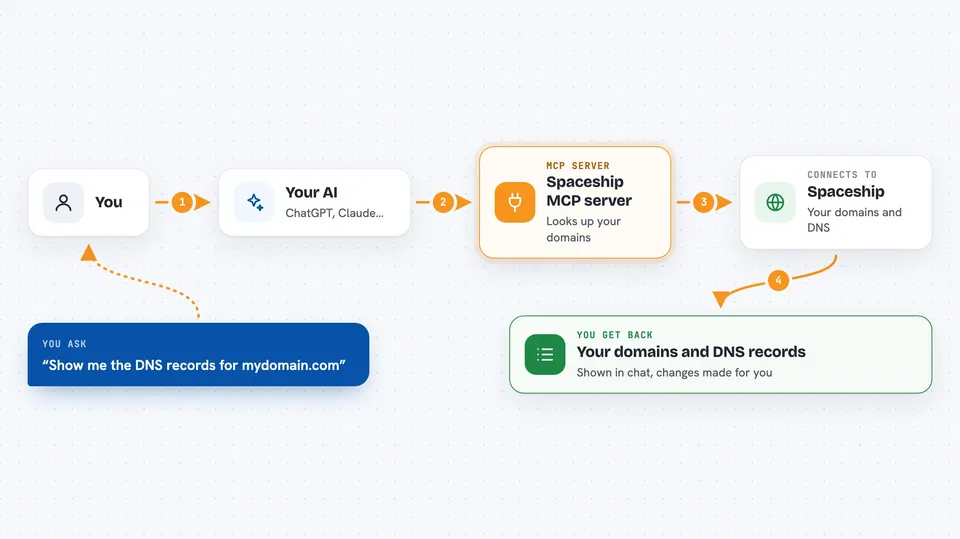
You type a request in plain words, like asking which domains you own or what DNS records a domain has. Your AI passes that request to this helper program. The helper then talks to the Spaceship service using your account details, and brings the answer back. Your AI shows you the result in the chat, or makes the change you asked for. You never have to open the Spaceship website yourself.
 Click to zoom
What you can do with it
- List all the domains in your Spaceship account
- Check whether a domain name is still available to buy
- Show the DNS records for a domain
- Add, change or delete DNS records
- Turn auto-renew on or off for a domain
- Update the contact details attached to a domain
- List a domain for sale on the marketplace and create a checkout link
Try asking your AI
- “List all my domains on Spaceship”
- “Show me the DNS records for mydomain.com”
- “Add an A record for www pointing to 203.0.113.10”
- “Is coolnewname.com still available to register?”
- “Turn off auto-renew for mydomain.com”
What it gives back to you
You get answers written out in the chat, like a list of your domains with their status, or a table of DNS records with their names, types and values. When you ask it to change something, it tells you what it did. Some actions, like registering a domain, run in the background and you can ask for their status.
Before you start
What you need
- A Spaceship account with at least one domain
- An API key and API secret from the Spaceship API Manager (these are like a username and password for apps; Spaceship gives you both when you create a key)
- An AI client that supports MCP, such as Claude Desktop, Claude Code, Cursor or VS Code
- Node.js installed on your computer (the free program that runs the helper)
Good to know
It can change real things in your account, including registering or renewing domains, which costs money, so check before you say yes.
Install it with your AI
Add Spaceship MCP server to your AI, no technical skills needed
You don't install anything by hand. You copy one prompt, paste it into an AI that can work on your computer, and it checks, installs and connects the server for you, asking you when it needs something.
Sign in to get the install prompt
Members get a ready-made prompt that lets the Claude desktop app check Spaceship MCP server, install it and connect it for them, step by step. You don't need any technical skills: you copy, paste and answer a few questions. Your connected AI can also find and install any of the 4,066 MCP servers here for you.
Who it's for
Anyone who owns domains at Spaceship and wants to manage them by chatting instead of clicking around the control panel.