
MCP server · Finance and crypto
W3Ledger MCP server
by baskcart
Lets your AI check token balances, make gift cards, and buy things on the W3Ledger ledger, with every move signed.
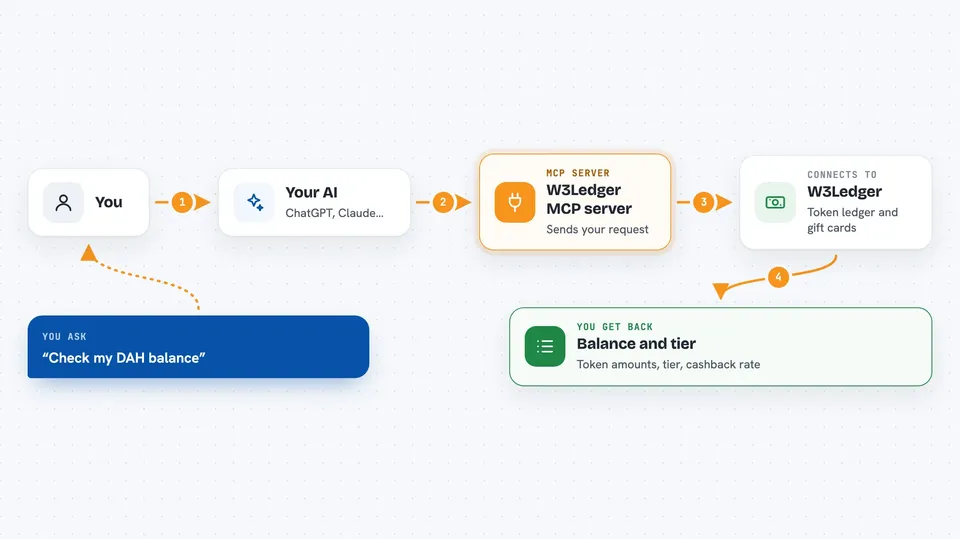
W3Ledger is a small helper that connects your AI assistant to the W3Ledger ledger, a place where balances, gift cards, and purchases are recorded. Once it is set up, you can ask your AI in plain words to check a balance or send a gift card, and it will walk you through the signing step. It is handy if you already use W3Ledger and want to do everyday tasks without opening a separate app.
What is an MCP server? The 30-second version
On its own, your AI can only chat. An MCP server is a small helper program that gives your AI one new skill, in this case a connection to the W3Ledger service. When you ask for something, the AI passes your request to this helper, and the helper talks to W3Ledger for you. You stay in the chat; the helper does the running around.
What this MCP server does
You type a request, like checking a balance or sending a gift card. Your AI sends that request to the W3Ledger helper running quietly on your computer. The helper forwards it to the W3Ledger service over the internet. For anything that moves tokens, the helper asks you to sign with your wallet, and the service checks both signatures before it changes anything. Then the answer comes back into your chat as a short message.
 Click to zoom
What you can do with it
- Check token balances for a public key, including DAH, DAHYM, DAHLOR, and W3SH
- See your loyalty tier and cashback rate
- Create a gift card by debiting your DAH balance
- Claim a gift card that was issued to you
- Create a sponsor card tied to a location
- Claim a sponsor card near the sponsor's location
- Buy a product and pay the merchant in DAH
Try asking your AI
- “Check my balance”
- “Send a 100 DAH gift card to my friend for coffee”
- “Buy a VR session for 35 DAH”
- “Claim the gift card that was sent to me”
What it gives back to you
You get short, clear answers in the chat. A balance check comes back as a list of token amounts plus your tier and cashback rate. A gift card or purchase comes back as a confirmation with an ID, the amount spent, and your new balance. Sometimes you also see cashback in W3SH.
Before you start
What you need
- Node.js 18 or newer on your computer
- The Claude desktop app, Cursor, or VS Code
- A wallet that can sign transactions (for example MetaMask or a Solana wallet)
- A W3Ledger account with some DAH balance for anything that spends tokens
Good to know
Anything that moves tokens needs your wallet signature, and once a transaction is signed and confirmed it cannot be undone, so read the amount and the recipient before you sign.
Install it with your AI
Add W3Ledger MCP server to your AI, no technical skills needed
You don't install anything by hand. You copy one prompt, paste it into an AI that can work on your computer, and it checks, installs and connects the server for you, asking you when it needs something.
Sign in to get the install prompt
Members get a ready-made prompt that lets the Claude desktop app check W3Ledger MCP server, install it and connect it for them, step by step. You don't need any technical skills: you copy, paste and answer a few questions. Your connected AI can also find and install any of the 4,609 MCP servers here for you.
Who it's for
People who already use W3Ledger for balances, gift cards, or purchases and want to handle those tasks by chatting with their AI instead of opening another app.



