MCP server · Gaming
Beckett MCP server for Godot
by beckettlab
Lets your AI look at, edit and run your Godot game project, and even see the running game.
Beckett is a helper for the Godot 4 game editor. It lets an AI assistant like Claude look inside your project, write and fix scripts, build scenes, and start your game so it can watch what happens. It is handy if you make games in Godot and want an AI to do the fiddly clicking and typing for you.
What is an MCP server? The 30-second version
On its own, your AI can only chat. An MCP server is a small helper program that gives your AI a new skill or a connection to an app. This one is a plugin inside the Godot editor itself, so once it is on, your AI can look things up in your game project and make changes there when you ask. You do not install anything extra like Node or Python; the plugin is the helper.
What this MCP server does
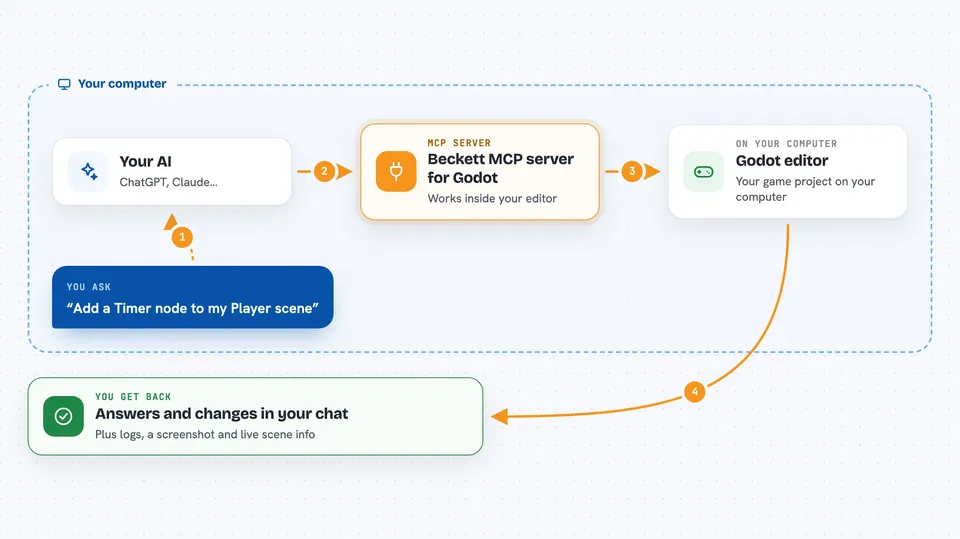
You ask your AI something about your Godot project, like adding a node or fixing a script. The AI sends that request to the Beckett plugin running inside your editor. The plugin does the work in Godot, such as creating the node, checking the script compiles, or starting the game. Then it sends the result back, so you see the answer or the change in your chat and in the editor.
 Click to zoom
What you can do with it
- Look up any Godot class, method or property and explain it
- Create, rename, move and delete nodes in your scenes
- Write and patch GDScript or C# scripts, with a check that they compile first
- Connect signals between nodes
- Run your game and read its logs and errors
- Take a screenshot of the running game and read its live scene tree
- Check performance numbers while the game runs
Try asking your AI
- “What classes in Godot can play a sound?”
- “Add a Timer node to my Player scene and connect its timeout signal to my script”
- “Write a script for a coin that disappears when the player touches it, and make sure it compiles”
- “Run my main scene and tell me if there are any errors in the logs”
What it gives back to you
You get answers in plain chat: lists of classes or methods, explanations, and confirmation that a change was made. When it writes or edits a script, it tells you if the code passed the compile check or shows the errors. If it runs your game, it can send back log lines, a screenshot, and a snapshot of the live scene tree and node values.
Before you start
What you need
- Godot 4.2 or newer (4.4 or newer recommended)
- The Beckett plugin installed in your Godot project and turned on
- An AI client that can talk to MCP servers, like Claude Code or Cursor
Good to know
The AI can change, overwrite or delete things in your Godot project, so keep a backup or a version control copy before letting it work.
Install it with your AI
Add Beckett MCP server for Godot to your AI, no technical skills needed
You don't install anything by hand. You copy one prompt, paste it into an AI that can work on your computer, and it checks, installs and connects the server for you, asking you when it needs something.
Sign in to get the install prompt
Members get a ready-made prompt that lets the Claude desktop app check Beckett MCP server for Godot, install it and connect it for them, step by step. You don't need any technical skills: you copy, paste and answer a few questions. Your connected AI can also find and install any of the 4,361 MCP servers here for you.
Who it's for
Godot game makers who use an AI assistant and want help with scripts, scenes and testing without leaving the editor.