MCP server · Gaming
Godot MCP Runtime
by Erodenn
Lets your AI run your Godot game, take screenshots, click buttons, and check that its own changes work.

This is a helper for people making games in Godot, a free game-making program. It lets your AI assistant actually start your game, look at what is on screen, press keys and click buttons, and run small bits of code to check things. It is handy if you use an AI to write or change parts of your game and want it to test its own work instead of you doing it by hand.
What is an MCP server? The 30-second version
On its own, your AI can only chat with you. An MCP server is a small helper program that gives your AI a new skill or a connection to another program. This one connects your AI to Godot, the game-making tool, so it can open your project, change scenes and scripts, and even run the game to see what happens. You just ask in normal words, and the helper does the clicking and checking for you.
What this MCP server does
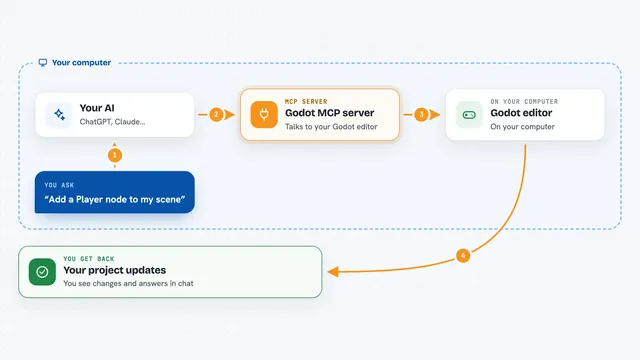
You ask your AI to do something with your Godot project, like add a button or check that a level loads. The AI uses this helper, which talks to Godot on your computer. For editing, it can create scenes, add nodes, attach scripts, and check your code without opening the Godot editor window. For testing, it starts your game, takes a picture of the screen, sends pretend key presses and mouse clicks, and reports back what changed. Then it tells you what it found, in plain words in your chat.
 Click to zoom
What you can do with it
- Create and edit scenes, nodes, and scripts in your Godot project
- Start your game and take a screenshot of what is on screen
- Simulate key presses, mouse clicks, and typed text in the running game
- List every visible button, label, and menu on screen with their positions
- Run small pieces of GDScript code against the live game to test values
- Check that a scene loads and a button responds without errors
- Profile which parts of your code are slowest while the game runs
Try asking your AI
- “Start my Godot project and take a screenshot of the main menu”
- “Click the Start button and tell me if the next scene loaded”
- “Add a Label node to the Main scene and set its text to Hello”
- “Run this GDScript and tell me what the player's health value is”
What it gives back to you
You get answers in your chat: short summaries of what happened, lists of buttons and labels on screen, and screenshots you can look at. When it changes your project, it tells you which files or nodes it touched. If something fails, it explains what went wrong and suggests a fix.
Before you start
What you need
- Node.js version 20 or newer
- Godot 4.x installed on your computer
- The path to your Godot program file (or Godot on your system PATH)
- An MCP-compatible AI app like Claude Desktop, Claude Code, or Cursor
Good to know
It can change your project files and run code inside your game, so keep backups and only let it do things you are comfortable with.
Install it with your AI
Add Godot MCP Runtime to your AI, no technical skills needed
You don't install anything by hand. You copy one prompt, paste it into an AI that can work on your computer, and it checks, installs and connects the server for you, asking you when it needs something.
Sign in to get the install prompt
Members get a ready-made prompt that lets the Claude desktop app check Godot MCP Runtime, install it and connect it for them, step by step. You don't need any technical skills: you copy, paste and answer a few questions. Your connected AI can also find and install any of the 4,361 MCP servers here for you.
Who it's for
Game makers using Godot who want an AI to help build and test their game without doing every check by hand.