MCP server · Gaming
debuff MCP server
by debuffjp
Lets your coding AI play, test and tune the 2D browser game you are building with debuff.
This is a helper for people making small 2D games for the browser with a toolkit called debuff. It lets a coding AI actually play and inspect the game you have open, instead of just reading the code and guessing. It is handy if you are building a game and want an AI to help you find bugs and tune how it feels.
What is an MCP server? The 30-second version
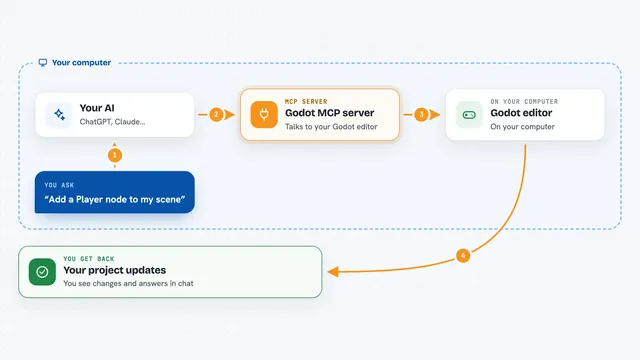
On its own, your AI can only chat with you. An MCP server is a small helper program that gives your AI a new skill or a connection to an app or service. This one connects your AI to debuff, the toolkit you use to build your 2D browser game. So when you ask, the AI can look at the running game, check what is happening and try things out for you.
What this MCP server does
You ask your AI something about your game, like why it crashes or why a jump feels wrong. The AI uses this helper to attach to the game you have open, or to a copy running without a window. The helper reads the live state, the frame timings and any errors, and explains them in plain words with the source line. It can also tune the feel values, rewind, replay, run random playtesting and check fixed scenarios. You get answers, notes and small changes back in the chat.
What you can do with it
- Attach to the game you have open and read what is happening right now
- Get errors explained with the file and line they came from
- See frame timings so you know where the game slows down
- Tune feel values like speeds and timings while you play
- Rewind and replay to bring a bug back exactly
- Run random playtesting and get crashes back as replay files
- Verify changes with fixed scenarios that run the same way each time
Try asking your AI
- “Why does my game crash when I pick up the coin?”
- “The jump feels floaty, can you tune it and show me the new values?”
- “Run a fuzz test for a minute and tell me if anything breaks”
- “Check the frame timings and tell me what is slow”
- “Replay the last crash and explain what went wrong”
What it gives back to you
Before you start
What you need
- Node.js 22 or newer
- A debuff game project, made with npm create debuff
- A coding agent that can use MCP servers, like Claude Code
Good to know
It can change your game's feel values and run tests that change the running game, so keep your work saved.
Install it with your AI
Add debuff MCP server to your AI, no technical skills needed
You don't install anything by hand. You copy one prompt, paste it into an AI that can work on your computer, and it checks, installs and connects the server for you, asking you when it needs something.
Sign in to get the install prompt
Members get a ready-made prompt that lets the Claude desktop app check debuff MCP server, install it and connect it for them, step by step. You don't need any technical skills: you copy, paste and answer a few questions. Your connected AI can also find and install any of the 4,609 MCP servers here for you.
Who it's for
People making small 2D browser games with debuff who want an AI to help test, debug and tune them.