MCP server · Gaming
Godot Forge MCP server
by gregario
Lets your AI run Godot 4 tests, check GDScript code, look up API docs, and take screenshots.

Godot Forge is a helper for people who make games with Godot 4. It connects your AI assistant to your Godot project so the AI can run your tests, check your scripts and scenes, and look up the right Godot 4 commands. It is handy if you write GDScript and want your AI to stop suggesting old Godot 3 code.
What is an MCP server? The 30-second version
On its own, your AI can only chat with you. An MCP server is a small helper program that gives your AI a new skill or a connection to an app. This one connects your AI to Godot, the free game engine, so it can look things up and do things in your project when you ask. You install it once, and then your AI can run tests and read your files for you.
What this MCP server does
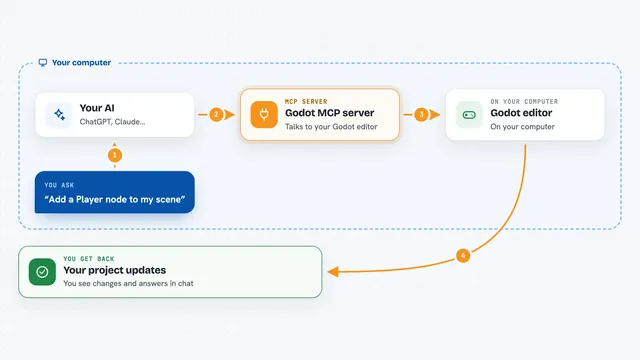
You ask your AI something about your Godot project, like running a test or checking a script. The AI sends that request to Godot Forge, which talks to your Godot project on your computer. Godot Forge runs the test or reads the file and sends the result back. Your AI then explains the result to you in the chat. Some tools need Godot installed, but six of the eight work without it.
 Click to zoom
What you can do with it
- Run your GUT or GdUnit4 tests and see which passed or failed
- Look up Godot 4 API docs and see what changed from Godot 3
- Check a GDScript file for common mistakes like old Godot 3 code
- Read a scene file and spot problems like deep nesting or missing scripts
- Get a quick overview of your project's structure
- See real compiler errors and warnings from Godot's editor
- Take a screenshot of your game's viewport
Try asking your AI
- “Run the water profile tests”
- “What is the Godot 4 version of KinematicBody?”
- “Check my player.gd script for problems”
- “Take a screenshot of my game's main scene”
What it gives back to you
You get answers in the chat, like a list of tests with pass and fail counts, or a summary of problems found in a script. For tests you also see failure details with file names and line numbers. Screenshots come back as an image your AI can look at. Everything is explained in plain words by your AI.
Before you start
What you need
- Node.js 18 or newer (a free program that runs the helper)
- Godot 4.x installed if you want to run tests, launch the project, or take screenshots
- An AI app that supports MCP, like Claude Code, Cursor, or VS Code
Good to know
Some tools can start or stop your game and take screenshots, so only use it on projects you are happy to have your AI look at.
Install it with your AI
Add Godot Forge MCP server to your AI, no technical skills needed
You don't install anything by hand. You copy one prompt, paste it into an AI that can work on your computer, and it checks, installs and connects the server for you, asking you when it needs something.
Sign in to get the install prompt
Members get a ready-made prompt that lets the Claude desktop app check Godot Forge MCP server, install it and connect it for them, step by step. You don't need any technical skills: you copy, paste and answer a few questions. Your connected AI can also find and install any of the 4,361 MCP servers here for you.
Who it's for
Game developers and hobbyists who build games in Godot 4 and use an AI assistant while coding.