MCP server · Finance and crypto · official
EquiVault MCP server
by equivault · official
Lets your AI look up company financials, ratios, quotes, peers, and portfolio signals from EquiVault.
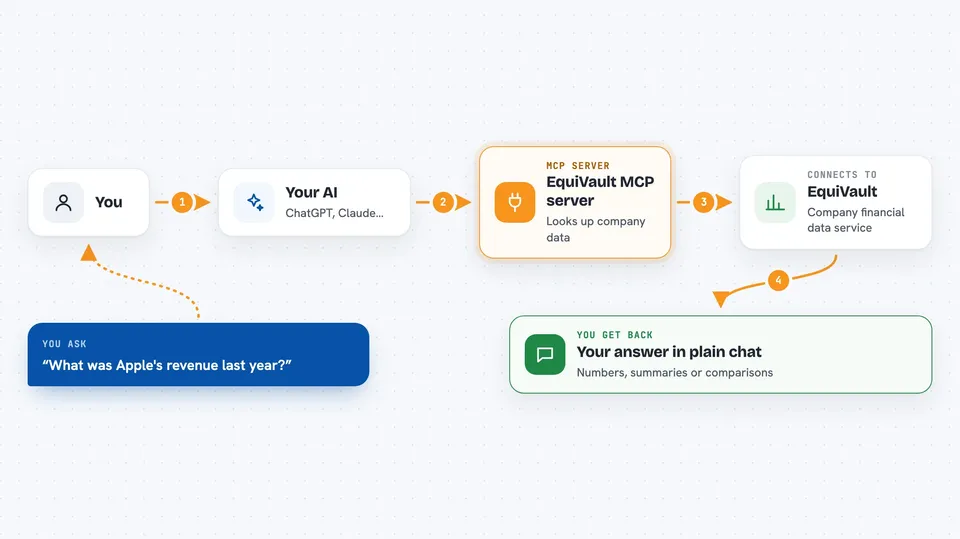
This is a helper that connects your AI assistant to EquiVault, a service that holds equity research data about public companies. Once it is set up, you can ask your AI normal questions about a company and it will pull the numbers and summaries from EquiVault for you. It is handy for anyone who does light research on stocks, whether for work or for their own watchlist.
What is an MCP server? The 30-second version
On its own, your AI can only chat with what it already knows. An MCP server is a small helper program that gives your AI a new skill or a connection to an outside service. This one connects your AI to EquiVault, so when you ask about a company, your AI can go and look things up there instead of guessing. You stay in the chat; the helper does the fetching behind the scenes.
What this MCP server does
You ask your AI a question, like what a company's revenue was last year or how two competitors compare. Your AI passes that request to this helper, which talks to the EquiVault service using your account. EquiVault sends back the matching data, such as financial statements, ratios, quotes, or a peer comparison. Your AI then turns that into a normal answer in the chat. Some tools also let you set up alerts or pull a portfolio overview.
 Click to zoom
What you can do with it
- Look up a company by name, ticker, or keyword
- Pull financial statements, ratios, and current stock quotes
- Screen companies by financial criteria like market cap or P/E
- Compare several companies side by side
- Read investment briefs and management guidance
- Check insider transactions and portfolio analytics
- Create, update, or delete alert rules
Try asking your AI
- “What are Apple's latest annual financials and key metrics?”
- “Find technology companies with a market cap over $10B and a P/E under 20.”
- “Compare Microsoft, Google, and Amazon on revenue growth and profit margins.”
- “How many queries do I have left this month?”
What it gives back to you
You get answers in plain chat: numbers, short summaries, lists of companies, or side-by-side comparisons. For example, a screen might come back as a short table of matching companies with their key figures. A brief or deep dive comes back as a longer written summary with the main points. When you create or change an alert, the AI confirms what it did.
Before you start
What you need
- An EquiVault account with an API key
- Your EquiVault tenant ID (a short identifier for your account)
- Node.js installed on your computer so the npx command can run
- The Claude desktop app or Claude Code, if you want to add it there
Good to know
Some tools can create, change, or delete alert rules on your EquiVault account, so check with your AI before confirming those actions.
Install it with your AI
Add EquiVault MCP server to your AI, no technical skills needed
You don't install anything by hand. You copy one prompt, paste it into an AI that can work on your computer, and it checks, installs and connects the server for you, asking you when it needs something.
Sign in to get the install prompt
Members get a ready-made prompt that lets the Claude desktop app check EquiVault MCP server, install it and connect it for them, step by step. You don't need any technical skills: you copy, paste and answer a few questions. Your connected AI can also find and install any of the 4,361 MCP servers here for you.
Who it's for
Anyone who does light equity research, like analysts, advisors, students, or individual investors who want quick company facts without leaving their chat.