
MCP server · Finance and crypto
Bitte Protocol MCP server
Lets your AI work with blockchain agents across several blockchains through Bitte Protocol.
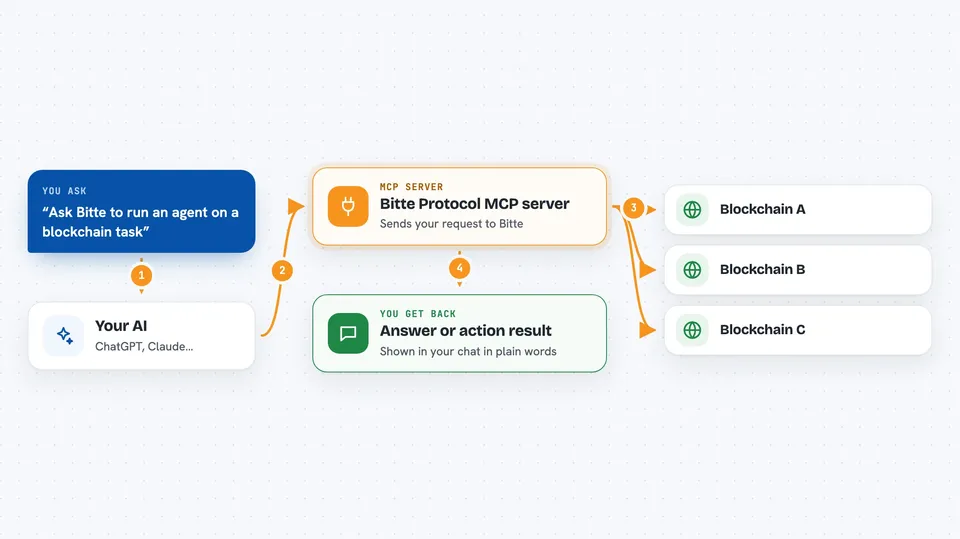
This is a helper that connects your AI assistant to Bitte Protocol, a service for running AI agents on blockchains. It is handy if you already use Bitte or want your chat assistant to reach blockchain-based agents without leaving the chat. You do not need to install anything, you just point your AI app at a web address.
What is an MCP server? The 30-second version
On its own, your AI can only chat with you using what it already knows. An MCP server is a small helper program that gives your AI a new skill or a connection to an outside service. This one connects your AI to Bitte Protocol, which runs AI agents on blockchains. So when you ask something that needs Bitte, your AI passes the request to this helper, and the helper talks to Bitte for you.
What this MCP server does
You ask your AI a question or give it a task that involves Bitte Protocol. Your AI sends that request to this MCP server over the web. The server talks to Bitte, which runs AI agents on several blockchains. Bitte sends back an answer or the result of the action. Your AI then shows you that result in the chat, in plain words.
 Click to zoom
What you can do with it
- Ask your AI to reach Bitte Protocol agents
- Run tasks that involve blockchain-based AI agents
- Work across several blockchains through one connection
- Check what a Bitte agent can do for you
- Get answers from Bitte without leaving your chat app
Try asking your AI
- “Use Bitte to run an agent on this blockchain task”
- “Ask Bitte what agents are available right now”
- “Have Bitte handle this request across chains”
- “Check with Bitte whether this action is possible”
What it gives back to you
You get answers and results back in your chat, written the way your AI normally replies. Depending on what you asked, that could be a short explanation, a status, or the outcome of an action Bitte carried out. The README does not list exact output formats, so what you see depends on the request and on Bitte itself.
Before you start
What you need
- An AI app that supports MCP servers over the web (the README shows an example for Cursor)
- The Bitte MCP address: https://mcp.bitte.ai/sse
Good to know
This connects your AI to blockchain agents, so anything that moves funds or changes things on a chain can have real consequences; check before you confirm.
Install it with your AI
Add Bitte Protocol MCP server to your AI, no technical skills needed
You don't install anything by hand. You copy one prompt, paste it into an AI that can work on your computer, and it checks, installs and connects the server for you, asking you when it needs something.
Sign in to get the install prompt
Members get a ready-made prompt that lets the Claude desktop app check Bitte Protocol MCP server, install it and connect it for them, step by step. You don't need any technical skills: you copy, paste and answer a few questions. Your connected AI can also find and install any of the 4,066 MCP servers here for you.
Who it's for
People who already use Bitte Protocol or want their AI assistant to reach blockchain-based agents without technical setup.




