MCP server · API
GraphQL MCP server
by blurrah
Lets your AI look up data from a GraphQL service and run queries for you in plain chat.
This is a small helper that connects your AI assistant to a GraphQL service. GraphQL is a way that apps share their data over the internet, and many companies use it behind the scenes. If your team has a GraphQL service and you would like your AI to fetch answers from it, this is for you.
What is an MCP server? The 30-second version
On its own, your AI can only chat with you. An MCP server is a small helper program that gives your AI a new skill or a connection to an app or service. This one connects your AI to a GraphQL service, so the AI can look things up there for you when you ask. You stay in the chat, and the helper does the talking to the service.
What this MCP server does
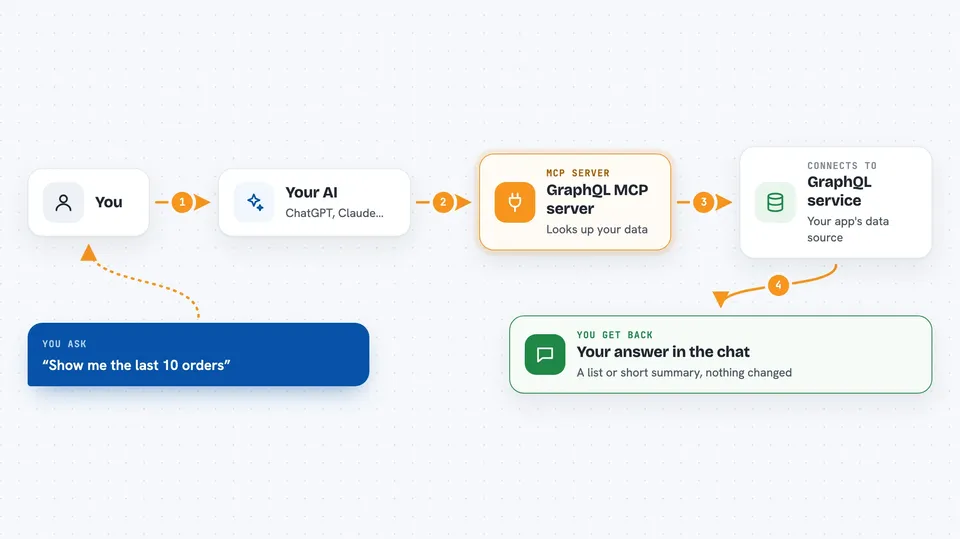
You ask your AI a question in normal words. The AI uses this helper to talk to your GraphQL service. First the helper reads the service's schema, which is like a map of what data is available. Then it sends a query to fetch the data you asked about. You get the answer back in the chat, in plain text.
 Click to zoom
What you can do with it
- Look up what data your GraphQL service offers
- Fetch records or lists from the service by asking in plain words
- Read a single item, like a customer or an order
- Run read-only queries without changing anything
- Use a saved schema file if the service does not allow live lookups
- Turn on write actions only if you deliberately allow them
Try asking your AI
- “Show me the last 10 orders from our GraphQL service.”
- “What fields are available on the customer type?”
- “Find the customer with email ana@example.com and show their details.”
- “List all products that are currently out of stock.”
What it gives back to you
You get answers back in the chat, usually as a list or a short summary of the data you asked for. If you ask about the schema, you get a description of the types and fields the service offers. Read-only queries do not change anything on the service. If write actions are turned on, the helper can also report what it changed.
Before you start
What you need
- The web address of your GraphQL service (called an endpoint)
- Any login details your service needs, like a token, if it is not open
- Node.js installed on your computer, since the helper runs with npx
- A Claude or other AI app that supports MCP servers
Good to know
If you turn on write actions, the AI can change or delete data in your service, so keep them off unless you really need them.
Install it with your AI
Add GraphQL MCP server to your AI, no technical skills needed
You don't install anything by hand. You copy one prompt, paste it into an AI that can work on your computer, and it checks, installs and connects the server for you, asking you when it needs something.
Sign in to get the install prompt
Members get a ready-made prompt that lets the Claude desktop app check GraphQL MCP server, install it and connect it for them, step by step. You don't need any technical skills: you copy, paste and answer a few questions. Your connected AI can also find and install any of the 4,609 MCP servers here for you.
Who it's for
Office workers and analysts whose team uses a GraphQL service and who want to ask questions about that data without writing code.