
MCP server · Finance and crypto
Baozi.bet MCP server
Lets your AI browse Solana prediction markets on Baozi.bet, place bets, claim winnings and create markets.
This is a small helper that connects your AI assistant to Baozi.bet, a website for prediction markets on the Solana network. You can ask your AI to look up markets, check what a bet would pay, and prepare bets for you to approve. It is handy if you already use Baozi.bet and want to do things by chatting instead of clicking around the site.
What is an MCP server? The 30-second version
On its own, your AI can only chat with you. An MCP server is a small helper program that gives your AI a new skill or a connection to an app or service. This one connects your AI to Baozi.bet, so it can look up markets and prepare actions there for you. You still sign everything yourself in your own wallet, so your AI never gets your keys.
What this MCP server does
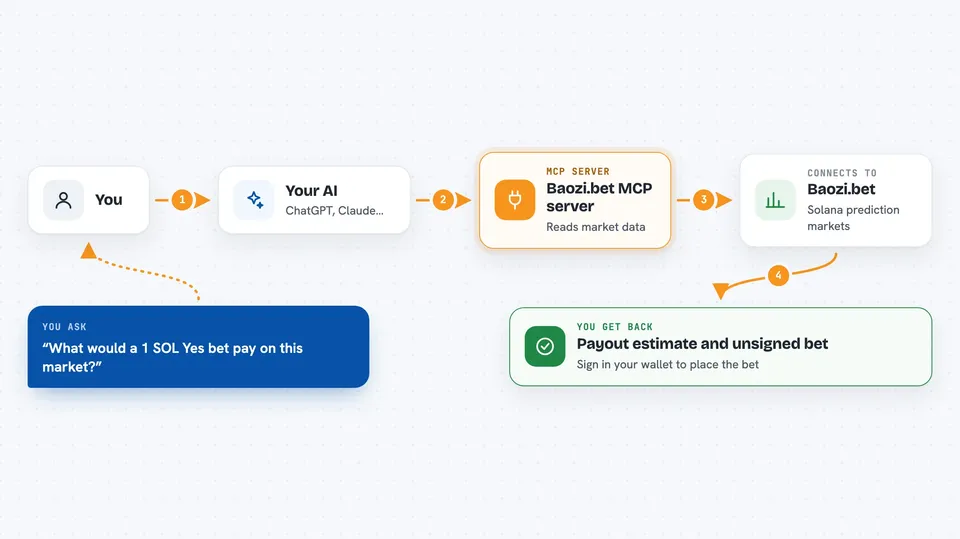
You ask your AI something like which markets are open, or what a 1 SOL bet would pay. The AI uses this helper to talk to Baozi.bet and read the market data. If you want to bet, the helper builds the transaction and hands it back unsigned. You then sign it in your own wallet, and only then does it go to the Solana network. The same flow works for claiming winnings, creating a market, or checking your positions.
 Click to zoom
What you can do with it
- Browse open markets and see their details
- Check what a bet would pay before you place it
- Prepare a bet for you to sign in your wallet
- Claim winnings or refunds from markets you bet on
- Create your own market and set the rules
- Track your positions and what is claimable
- Register an affiliate code and earn commission on referrals
Try asking your AI
- “Show me the active Lab markets on Baozi right now”
- “What would a 1 SOL Yes bet pay on this market”
- “Build a bet transaction for 0.5 SOL on Yes for that market”
- “What can I claim from my Baozi positions”
What it gives back to you
You get back plain answers in the chat: lists of markets, prices, payout estimates, your positions, and how much you can claim. When you ask for an action like a bet or a claim, it gives you an unsigned transaction you sign in your wallet. After you sign, the result shows up on Solana and you can check it on a block explorer. Nothing moves until you sign.
Before you start
What you need
- Node.js installed on your computer (the free software that runs the helper)
- A Solana wallet with some SOL for bets and small fees
- An AI app that supports MCP, like Claude Desktop, Claude Code, Cursor or Windsurf
Good to know
It prepares real transactions with real SOL, so always read what you are signing in your wallet before you approve it.
Install it with your AI
Add Baozi.bet MCP server to your AI, no technical skills needed
You don't install anything by hand. You copy one prompt, paste it into an AI that can work on your computer, and it checks, installs and connects the server for you, asking you when it needs something.
Sign in to get the install prompt
Members get a ready-made prompt that lets the Claude desktop app check Baozi.bet MCP server, install it and connect it for them, step by step. You don't need any technical skills: you copy, paste and answer a few questions. Your connected AI can also find and install any of the 4,609 MCP servers here for you.
Who it's for
People who already use Baozi.bet or are curious about Solana prediction markets and want to browse and bet by chatting with their AI.



