MCP server · Security
HexForge Gateway MCP server
Lets your AI inspect and take apart Android app files (APKs) using tools like jadx, apktool, adb and Frida.

HexForge Gateway is a workspace for looking inside Android app files, the ones ending in .apk. It runs on your own computer or phone and gives your AI helper a set of tools to open, inspect and poke at those files. It is handy for people who are curious about how an Android app is built, or who do security checks on apps.
What is an MCP server? The 30-second version
On its own, your AI can only chat. An MCP server is a small helper program that gives your AI a new skill or a connection to an app or service. This one connects your AI to HexForge Gateway, which in turn talks to tools like jadx, apktool, adb and Frida. So when you ask your AI to look inside an APK, it can actually do it through this helper.
What this MCP server does
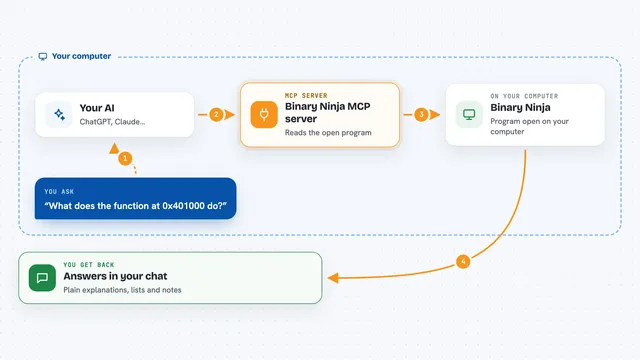
You ask your AI something about an Android app file. The AI passes that request to HexForge Gateway. The Gateway picks the right tool, like jadx to read the code or apktool to unpack the file, and runs it. It sends progress updates back as it works. When it is done, you get the result, such as a list of files, some code, or a summary, right in your chat.
 Click to zoom
What you can do with it
- Unpack an APK file to see what is inside
- Read the Java code from an Android app
- Check what an app is doing on a connected phone
- Run small scripts to watch an app while it runs
- Keep your work organised in workspaces
- Ask an AI to explain parts of an app's code
- Get live updates while a job is running
Try asking your AI
- “Unpack this APK and show me the main files inside”
- “What permissions does this app ask for?”
- “Show me the code that handles login in this app”
- “Watch this app on my phone and tell me what it does when I tap the button”
What it gives back to you
You get back whatever the tool found: a list of files, some code, a summary, or a note that a job finished. Updates appear in your chat as the work happens. If something fails, you see an error message explaining what went wrong.
Before you start
What you need
- Node.js 22 or newer installed on your computer
- The HexForge Gateway program running (it comes from the GitHub page)
- The tools it uses, like jadx, apktool, adb and Frida, installed on the same machine
- An Android phone connected by cable if you want to watch a live app
Good to know
This tool can open and change files on your computer and on a connected phone, so only use it on apps and devices you own or have permission to test.
Install it with your AI
Add HexForge Gateway MCP server to your AI, no technical skills needed
You don't install anything by hand. You copy one prompt, paste it into an AI that can work on your computer, and it checks, installs and connects the server for you, asking you when it needs something.
Sign in to get the install prompt
Members get a ready-made prompt that lets the Claude desktop app check HexForge Gateway MCP server, install it and connect it for them, step by step. You don't need any technical skills: you copy, paste and answer a few questions. Your connected AI can also find and install any of the 4,609 MCP servers here for you.
Who it's for
People who want to look inside Android apps, like security testers, curious developers, or anyone learning how apps are built.