MCP server · Gaming
Wick MCP server for Godot
Let your AI read Godot C# crashes, scene trees, and build errors with real source context.

Wick is a helper for people who make games in Godot with C#. When your game crashes or your build fails, it hands your AI assistant the full picture in one go instead of making you paste files back and forth. It is handy if you already use an AI coding assistant and want it to actually understand your Godot project.
What is an MCP server? The 30-second version
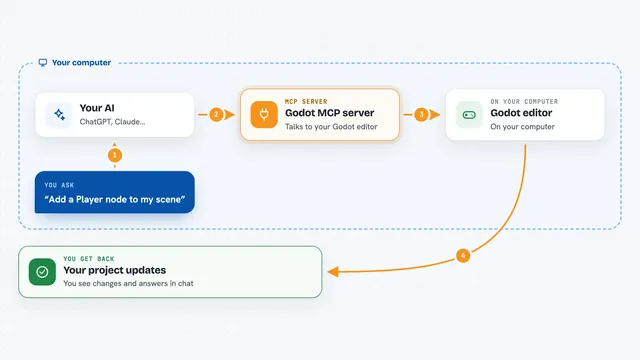
On its own, your AI can only chat with you. An MCP server is a small helper program that gives your AI a new skill or a connection to another tool. Wick is that helper for Godot: it sits next to your project, watches for crashes and build errors, and lets your AI look at your scenes and C# code when you ask. You keep talking to your AI the same way. Wick just gives it something useful to look at.
What this MCP server does
You ask your AI something like why did my game crash. Your AI calls Wick, and Wick reads the exception your game threw, then adds the actual method body, the nearby source lines, the caller chain, recent logs, and the scene state. It sends all of that back to your AI in one answer. For build problems, it does the same thing with dotnet build errors. You get a diagnosis in the chat instead of a long back and forth.
 Click to zoom
What you can do with it
- Diagnose a C# crash with the method body and caller chain attached
- Look up a C# symbol, its references, and its member signatures
- Run dotnet build, test, and clean from your AI chat
- Read and parse your Godot scene tree
- Launch and stop your game, and tail its logs
- Inspect GDScript files and use GDScript language support
- Catch async exceptions that normal crash logs miss, with the optional companion
Try asking your AI
- “My game crashed on the last run, can you tell me what went wrong and where”
- “Find every place in my C# code that calls PlayerHealth.TakeDamage”
- “Run a build and explain the errors in plain words”
- “Show me the scene tree for Main.tscn and point out anything odd”
What it gives back to you
You get answers in the chat: a plain explanation of the crash or build error, the C# method and lines involved, and the chain of calls that led there. For code questions it returns lists of matching symbols or references. For builds and tests it returns the output plus a short summary. For scenes it returns the scene tree structure.
Before you start
What you need
- .NET 10 SDK (10.0.201 or later)
- Godot 4.6.1 or newer with .NET/Mono support
- The Wick Godot addon installed in your project
- The Wick MCP server built from the repo, plus your Godot project path and Godot binary path set in the config
Good to know
Wick can start and stop your game and run build, test, and clean commands on your project, so keep an eye on what you ask it to do.
Install it with your AI
Add Wick MCP server for Godot to your AI, no technical skills needed
You don't install anything by hand. You copy one prompt, paste it into an AI that can work on your computer, and it checks, installs and connects the server for you, asking you when it needs something.
Sign in to get the install prompt
Members get a ready-made prompt that lets the Claude desktop app check Wick MCP server for Godot, install it and connect it for them, step by step. You don't need any technical skills: you copy, paste and answer a few questions. Your connected AI can also find and install any of the 4,361 MCP servers here for you.
Who it's for
Godot game developers who use C# and already work with an AI coding assistant.