
MCP server · Gaming
srdcheck MCP server
by chaoz23
Your AI can check Dungeons & Dragons 5e rules and get a clear, cited answer instead of a guess.
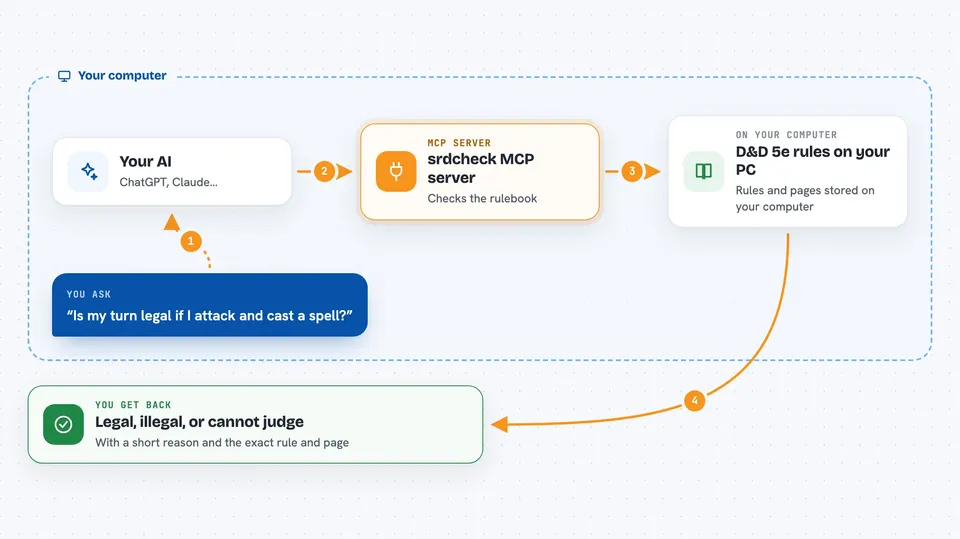
srdcheck is a small helper that answers Dungeons & Dragons 5e rules questions using the official System Reference Document 5.2.1. You ask your AI something like whether a turn is legal, and it comes back with a yes, a no, or an honest "I can't judge that," plus the exact page it came from. It is handy for anyone running or playing a game who wants rules calls they can trust and repeat.
What is an MCP server? The 30-second version
On its own, your AI can only chat and guess. An MCP server is a small helper program that gives your AI a new skill or a connection to a service. This one connects your AI to a set of D&D 5e rules, so when you ask a rules question, the AI can look it up in a fixed, offline rulebook instead of making something up. The same question always gives the same answer, and every answer points to the rule it used.
What this MCP server does
You ask your AI a specific rules question, such as whether a proposed turn spends too many actions or which options are still available. Your AI passes that question to srdcheck. srdcheck checks it against the D&D 5e rules it ships with, using no dice and no guessing. It sends back a verdict, a short plain-English reason, and the exact rule and page it relied on. If the question is outside what it covers, it says so instead of pretending to know.
 Click to zoom
What you can do with it
- Check whether a proposed turn is legal under the action economy
- List which action options are still available to a character
- Look up the exact rule text and page for a spell, creature, or condition
- Check a saving throw or concentration result using numbers you supply
- Refuse questions about content that is not in the official rules
- Confirm whether a name like a spell or class exists in the ruleset
Try asking your AI
- “Is this turn legal if I use my action to attack and my bonus action to cast a spell?”
- “What options are still available to me this turn?”
- “Show me the exact rule text for Mage Hand and which page it is on.”
- “Is Hexblade in the official 5e rules?”
What it gives back to you
You get a verdict in the chat: legal, illegal, or cannot judge. Along with it comes a short reason in plain English and the exact rule and page it came from. For some questions you also get a list of remaining options or a checked result for a save. If the question is outside its scope, it tells you that clearly instead of guessing.
Before you start
What you need
- Python 3.10 or newer installed on your computer
- A way to run the pip install command (a terminal or command prompt)
- An AI app that supports MCP servers, such as the Claude desktop app
Good to know
It only covers a slice of the official rules, so it will refuse many questions; treat a refusal as "not checked here," not as proof that something is allowed.
Install it with your AI
Add srdcheck MCP server to your AI, no technical skills needed
You don't install anything by hand. You copy one prompt, paste it into an AI that can work on your computer, and it checks, installs and connects the server for you, asking you when it needs something.
Sign in to get the install prompt
Members get a ready-made prompt that lets the Claude desktop app check srdcheck MCP server, install it and connect it for them, step by step. You don't need any technical skills: you copy, paste and answer a few questions. Your connected AI can also find and install any of the 4,361 MCP servers here for you.
Who it's for
Dungeon masters, players, and anyone running or playing D&D 5e who wants quick, consistent rules calls they can check.





