MCP server · Gaming · official
Scorezilla MCP server
by isco-tec · official
Add and check leaderboards for your game straight from your AI coding assistant.
This is the official helper from Scorezilla, a service for adding leaderboards to games. Once it is connected to your AI coding assistant, you can ask for a leaderboard and get working code pasted into your project. It is handy for game makers who want scores showing up without clicking around a dashboard.
What is an MCP server? The 30-second version
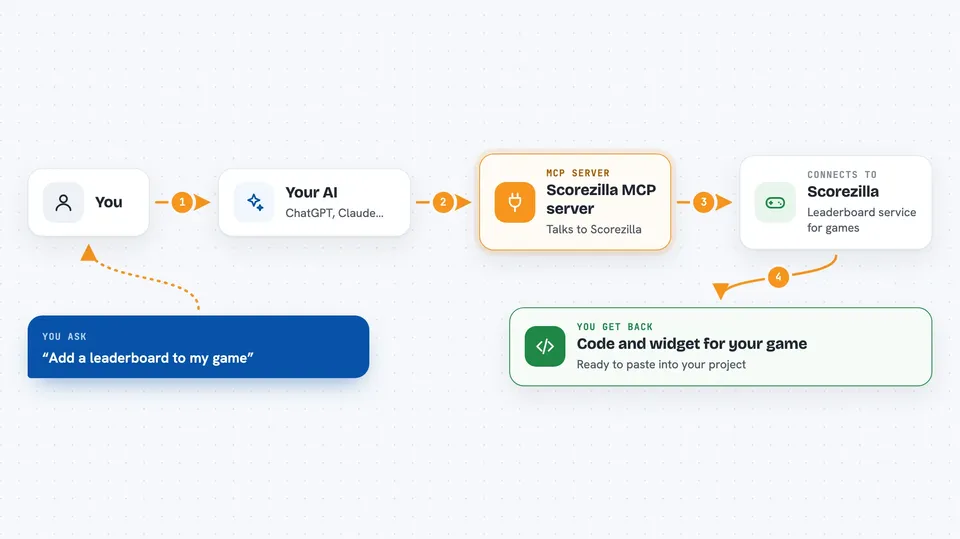
On its own, your AI can only chat with you. An MCP server is a small helper program that gives your AI a new skill or a connection to an app or service. This one connects your AI to Scorezilla, so it can set up games and leaderboards and read live scores for you. You just ask in plain words, and the helper does the talking to Scorezilla behind the scenes.
What this MCP server does
You ask your AI to add a leaderboard to your game. The AI uses this helper, and the helper talks to Scorezilla to create a game and a board for you. Then it hands back ready-to-paste code and a widget you can drop into your project. Later you can ask it to show the top scores on a board, so you can check that your setup actually works.
 Click to zoom
What you can do with it
- Create a new game and its first leaderboard in one step
- Get ready-to-paste code for your game in TypeScript, Python, Go or C#
- List the games and boards already on your account
- See the top scores on any board to check your setup
- Add a new board to a game you already have
- Get a fresh public and secret key pair for a game
- Update board settings like score limits and how long scores are kept
Try asking your AI
- “Add a Scorezilla leaderboard to this game”
- “What did my last test score rank?”
- “List my games”
- “Show me the boards on my puzzle game”
What it gives back to you
You get answers right in the chat: lists of your games and boards, the top scores on a board, or a block of code you can copy into your project. When it creates something, it tells you what it made and gives you the widget embed and code snippet. Secret keys are only shown once, and the full secret is never sent back by this helper.
Before you start
What you need
- A Scorezilla account (sign in at dashboard.scorezilla.dev)
- An MCP token from the Scorezilla dashboard (a kind of password for this helper)
- Node.js version 20 or newer
- An AI coding assistant that supports MCP, like Claude Code or Cursor
Good to know
This helper can create games, boards and keys on your account, so treat your token like a password and keep it out of shared files and chats.
Install it with your AI
Add Scorezilla MCP server to your AI, no technical skills needed
You don't install anything by hand. You copy one prompt, paste it into an AI that can work on your computer, and it checks, installs and connects the server for you, asking you when it needs something.
Sign in to get the install prompt
Members get a ready-made prompt that lets the Claude desktop app check Scorezilla MCP server, install it and connect it for them, step by step. You don't need any technical skills: you copy, paste and answer a few questions. Your connected AI can also find and install any of the 4,361 MCP servers here for you.
Who it's for
Game developers and hobbyist game makers who use an AI coding assistant and want a leaderboard without leaving their editor.