MCP server · Music
Apple Music MCP server
by Cifero74
Let your AI search Apple Music, browse your library, and build playlists for you.
This is a small helper that connects your AI assistant to your Apple Music account. Once it is set up, you can ask in plain words for songs, albums, or playlists, and the AI will look them up and even make changes for you. It is handy if you love music and want help finding or organising it without clicking around the app.
What is an MCP server? The 30-second version
On its own, your AI can only chat with you. An MCP server is a small helper program that gives your AI a new skill or a connection to an app or service. This one connects your AI to Apple Music, so it can look things up in the catalogue, peek at your library, and make playlists when you ask. You stay in charge; the AI just does the legwork.
What this MCP server does
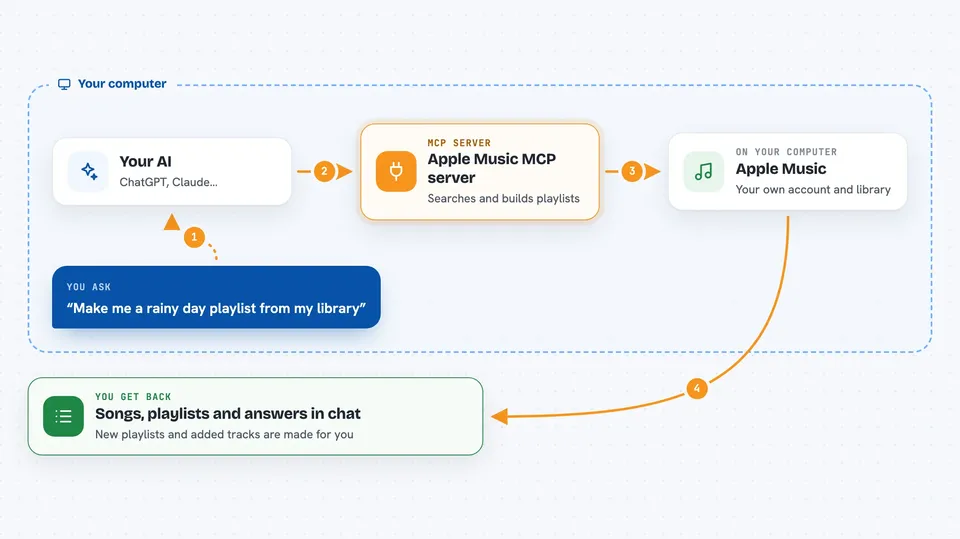
You type a request in plain words, like asking for songs by a certain artist or a playlist for a rainy day. Your AI passes that request to this helper program running on your computer. The helper talks to Apple Music using your account, then sends the answer back to your AI. Your AI then shows you the results in the chat, or makes the change you asked for, like creating a playlist. Everything happens through your own Apple Music account, so what you see matches what you have.
 Click to zoom
What you can do with it
- Search the Apple Music catalogue for songs, albums, artists, and playlists
- Search inside your own library for tracks you already have
- List your saved songs, albums, artists, and playlists
- See what is inside a specific playlist
- Create a new playlist with a name you choose
- Add songs from the catalogue or your library to a playlist
- See what you listened to recently and get personalised picks
Try asking your AI
- “Based on what I have been listening to lately, recommend 15 songs I do not have yet and add them to a new playlist called Fresh Finds.”
- “Show me all my playlists and tell me which artists appear most often.”
- “Search for albums by Nick Cave and tell me which ones are already in my library.”
- “Create a playlist called Rainy Sunday with the 10 most mellow tracks you can find in my library.”
What it gives back to you
You get answers written in the chat: lists of songs, albums, artists, or playlists, often with names and IDs. If you asked for a change, like a new playlist or added tracks, the AI tells you what it did. For searches, you see the matching items so you can pick what you want next. It is all text in the conversation, no files to download.
Before you start
What you need
- A paid Apple Developer Program membership (99 USD per year) to create a MusicKit key
- An active Apple Music subscription
- Python 3.10 or newer, and either uv or pip installed
- The Claude desktop app if you want to use it there
Good to know
It can create playlists and add songs to them in your real Apple Music account, so check before saying yes to changes you might not want.
Install it with your AI
Add Apple Music MCP server to your AI, no technical skills needed
You don't install anything by hand. You copy one prompt, paste it into an AI that can work on your computer, and it checks, installs and connects the server for you, asking you when it needs something.
Sign in to get the install prompt
Members get a ready-made prompt that lets the Claude desktop app check Apple Music MCP server, install it and connect it for them, step by step. You don't need any technical skills: you copy, paste and answer a few questions. Your connected AI can also find and install any of the 4,361 MCP servers here for you.
Who it's for
Music lovers and anyone who uses Apple Music and wants their AI to help find, sort, or build playlists without tapping through the app.