MCP server · Music
Ableton Live MCP server
by Pantani
Let your AI look at and change your Ableton Live set, like adding tracks, clips and devices.
This is a helper that connects your AI assistant to Ableton Live on your own computer. You ask in plain words, and the AI can look at your set, add tracks or clips, load devices, and check what changed. It is handy if you make music in Ableton and want a faster way to try ideas without clicking around so much.
What is an MCP server? The 30-second version
On its own, your AI can only chat. An MCP server is a small helper program that gives your AI a new skill or a connection to an app. This one connects your AI to Ableton Live on your machine, so it can look things up and make changes in your set when you ask. It is still early software, so treat it as a helpful experiment rather than a finished tool.
What this MCP server does
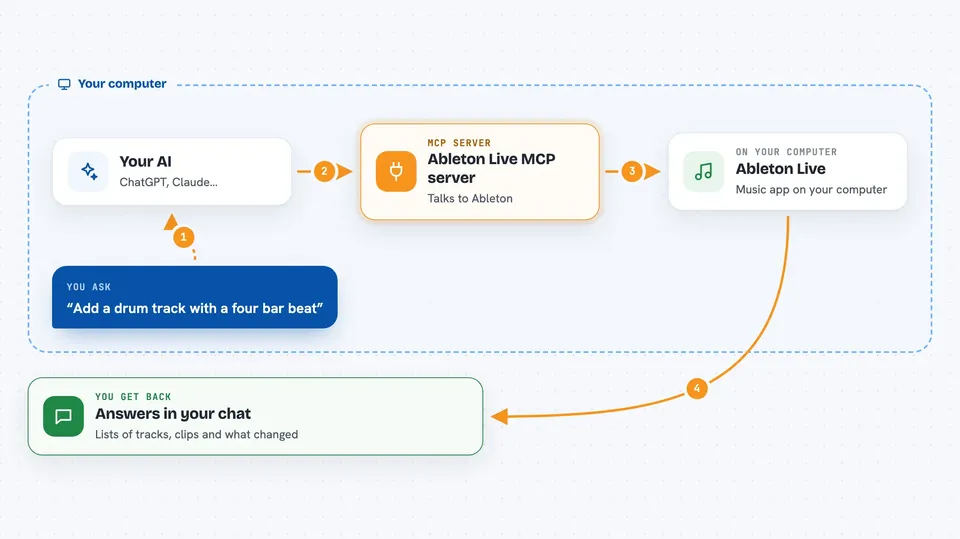
You type a request in your AI chat, like asking what is in your set or asking it to add a drum track. The AI sends that request to this helper. The helper talks to a small bridge running inside Ableton Live. Ableton does the work, and the helper sends the result back to your chat, so you can see what happened or ask for a change.
 Click to zoom
What you can do with it
- Inspect your current Live set and list tracks, scenes and clips
- Create new tracks, scenes and clips
- Load devices and instruments from the browser
- Apply ready-made music recipes like drum kits or basslines
- Check what changed after an edit with a snapshot and diff
- Watch for events in Live and get notified in chat
- Control Push pad and button LEDs
Try asking your AI
- “What tracks and clips are in my current set?”
- “Add a new MIDI track with a drum kit and a four-bar beat”
- “Load a bassline recipe into a new track”
- “Take a snapshot, then tell me what changed after I add a clip”
What it gives back to you
You get answers in your chat: lists of tracks, clips and devices, short summaries of what is in your set, and confirmations when something was added or changed. It can also show a before-and-after comparison so you can see exactly what was modified. Some replies are simple text, others are small tables or lists you can read right in the conversation.
Before you start
What you need
- Ableton Live 12 (Live 11 also works) on your computer
- Node.js version 20 or newer
- The Remote Script bridge installed inside Ableton Live
- The Claude desktop app or another AI tool that supports MCP servers
Good to know
This can change your Live set, so save your work first and use it on a copy until you trust it.
Install it with your AI
Add Ableton Live MCP server to your AI, no technical skills needed
You don't install anything by hand. You copy one prompt, paste it into an AI that can work on your computer, and it checks, installs and connects the server for you, asking you when it needs something.
Sign in to get the install prompt
Members get a ready-made prompt that lets the Claude desktop app check Ableton Live MCP server, install it and connect it for them, step by step. You don't need any technical skills: you copy, paste and answer a few questions. Your connected AI can also find and install any of the 4,361 MCP servers here for you.
Who it's for
Music makers and producers who use Ableton Live and want to try ideas faster with an AI assistant.